Submitting Blogger sitemap via Google Webmaster Tools
What is a site map?
Sitemap is an XML file that lists URLs for a site along with additional information about each URL: when it was last updated, how often it changes, and how important it is in relation to other URLs in the site.
Why do you need to submit a sitemap?
Sitemaps allow you to inform search engines about pages on your blogs that are available for crawling. This allows search engines to crawl the blog more intelligently.
Google says:
Google uses your Sitemap to learn about the structure of your site and to increase our coverage of your webpages. Submit a Sitemap to tell Google about pages on your site we might not otherwise discover.
So, if some of your posts have not been indexed by Google i.e. they don’t show up in Google search, submitting a proper sitemap might be the answer.
How do you make a sitemap?
You don’t have to, it’s already there. In Blogger, your blog sitemap is your post feed, located here:
http://yourblog.blogspot.com/atom.xmland here:
http://yourblog.blogspot.com/feeds/posts/default
How do you submit a sitemap?
- You go to Google Webmasters Tools homepage and sign in to your Google account.
- Click on your chosen blog to go to the blog’s Dashboard.
- Navigate to Traffic > Optimization > Sitemaps and click ADD/TEST SITEMAP button.
- When an input box appears, enter
atom.xml, append the necessary parameters and then click Submit Sitemap button.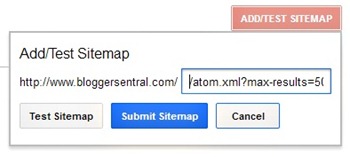
Related query parameters (to be appended to your feed URL):
- max-results –add this if your blog has more than 25 posts. This is because on its own, the default feed URL only fetches 25 of your latest posts. To be safe use
max-results=500since Blogger allows up to 500 number of posts per feed. - redirect=false -if you use FeedBurner to manage your blog feed, you probably had set your feed to redirect to FeedBurner’s URL. To make the sitemap work you need to stop the redirection.
- How to append the query parameters?
First append a question mark, then add the parameters. Separate each parameter with an ampersand (&). Example:atom.xml?max-results=500&redirect=false
- max-results –add this if your blog has more than 25 posts. This is because on its own, the default feed URL only fetches 25 of your latest posts. To be safe use
- Google will take a few hours to process your submission before the status changes from Pending to OK.

Enjoy!
25 comments to "Submitting Blogger sitemap via Google Webmaster Tools"
oh, thanks for the info.
I didnt know that i need to manually submit the site for indexing.
Blogger blogs usually get indexed even without submission, but if some of your pages are missing (not indexed) then submitting a sitemap may rectify it.
Wow! Thanks for the tips! It's really easy.
Atom is Sitemap?
@Tekkaus
Thank you, it's my pleasure.
@Hasbullah Pit
Yes, that's right.
Hi and thanks,
Can you tell me why most others are recommending feeds/posts/full for inclusion for the sitemap?
Regards, Paul
Hi Paul,
In my opinion it makes no difference. What matters is whether the feed contains the links directed to blog posts. Both short and full feeds have those. I myself prefer short feed due to its smaller file size.
Oh back to your question, the answer is I don't know why :)
hi thanks for the info
I tried the "feeds/posts/full" option and Google Webmaster Tools did not like it. It may have been because I was using Feedburner. I used the "atom.xml?max-results=500&redirect=false" from the recommendation above and I got the Green Checkmark in Google Webmaster Tools. Thanks for the information on how to get this done correctly.
@Barry C. Laminack
Glad it worked out.
thanx alot that really helps
really a great information, thank you for post.
When ever I submit my feed burner URL in blogger redirect box .. The site map at webmaster is showing error.
If I remove that here.. My feed burner status is showing error "Feed not found.. / error at Mill" ..
what's happening
@Anonymous
Make sure you append redirect=false to the sitemap URL.
I'm getting this error right now after using a hack to make search engines crawl more pages on my site. "Errors Sitemap is HTML Your Sitemap appears to be an HTML page." I deleted the two site maps that I had before making this change, which includes language like this:
/atom.xml?redirect=false&start-index=1501&max-results=500
Since that time I have had more page indexed and more hits, but my crawling is jumpy - up and down - peaks and valleys, not steady like it was in feb and march. This is all so confusing to me. Are you available for hire?
Hi paul..
thank you so much, your tutorial very helpful
Thank you so much sir. i was need but today i am happy. thanks again sir.
thank you very much for the great usefulkl information. I just submitted my sitemap to google
Thanks Very Much, I need this sitemap to submit bing webmaster too
is this posible: atom.xml?redirect=false&start-index=1&max-results=1000 ?
@Javine
Blogger allows only up to 500 posts per feed.
In your case you want to split the feed into two parts, like so:
atom.xml?redirect=false&start-index=1&max-results=500
atom.xml?redirect=false&start-index=501&max-results=500
and submit both of them to Google.
thanks very much, but when i submit sitemap selalu tertunda terus
Thanks for the guide, its really helpful.
Thanks a lot for the post.
finally...
the right tutorial,thank you so much
Post a Comment
We love to hear from you! Leave us a comment.
To ensure proper display, HTML/XML/Javascript need to be escaped first using this escape tool.