How to place Adsense below post title for higher CTR
Why below the post title? Because it is the position with the highest CTR (click-through rate). In other words the ad placed there will bring in the most money.
According to the Adsense ads positioning guideline published by Google, the best performing Adsense ad position is above the primary content i.e. above the blog post, as illustrated by the heat map.
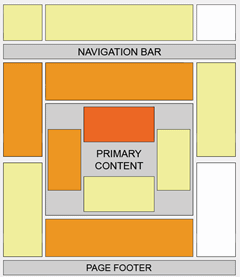 Placing an ad below post title (above post content) is a not at all difficult. All you have to do is create an ad unit on Google Adsense website, get the code and add it to the specified location in your blog template.
(You can’t use Blogger’s Inline Adsense or Adsense gadget because it doesn’t have the option to add an ad under post title).
Here we go,
1. Preparing Adsense ad code
- Log in to Google Adsense and create a new ad unit.
- For best results choose a wide ad size -either 300x250 Medium Rectangle or 336x250 Large Rectangle format. Make sure you assign the ad a new ad channel for performance monitoring purposes.
- When the setup is complete, you will be given a code.
- Run the code through an HTML escape/parser tool to convert special characters into their corresponding HTML entities. The ad won’t appear if you use the original unescaped ad code.
- Copy the escaped code.
2. Adding ad code to the template
[Update June 2013] Change code searching method in line with the new Blogger template HTML editor.
- Go to Template > Edit HTML.
- Click “Jump to widget” tab and select “Blog1”.
- Click the "Blog1" fold marker ‘►’ to expand the widget and reveal a set of “includable” tags.
- Locate the
<b:includable id='post' var='post'>...</b:includable>includable and click the fold marker to reveal its content. - Scroll down and find the following code:
<data:post.body/>
- Paste the escaped ad code right above the line, like so:
<b:if cond='data:blog.pageType == "item"'> PLACE ESCAPED AD CODE HERE </b:if>
the conditional tag in lines 1 and 3 will make the ad appear only on post pages. If you want the ad to appear on all pages, just remove the lines. - Save and view your blog.
3. Monitor ad performance
Make sure you monitor the ad performance. Don’t automatically assume it succeeds in increasing CTR without seeing the actual results.
No two blogs are the same, what works on most blogs may or may not work on yours. If you don’t see positive changes, test again with different ad types, formats, colors and/or placements.
Enjoy!
205 comments to "How to place Adsense below post title for higher CTR"
«Oldest ‹Older 1 – 200 of 205 Newer› Newest»
-
XNYS,
March 21, 2011 at 7:39 PM
-
-
-
Unknown,
March 22, 2011 at 1:35 AM
-
-
-
auction,
March 22, 2011 at 10:12 AM
-
-
-
Emenike Ojiako,
March 22, 2011 at 11:52 AM
-
-
-
akubiomed,
March 22, 2011 at 2:26 PM
-
-
-
Anonymous,
March 22, 2011 at 4:20 PM
-
-
-
Greenlava,
March 22, 2011 at 8:28 PM
-
-
-
Greenlava,
March 22, 2011 at 8:43 PM
-
-
-
Donald,
March 22, 2011 at 10:39 PM
-
-
-
bippi,
March 24, 2011 at 5:40 PM
-
-
-
daus,
March 27, 2011 at 9:49 PM
-
-
-
Sharinginfoz,
March 28, 2011 at 8:18 AM
-
-
-
arlek,
March 28, 2011 at 1:16 PM
-
-
-
say,
March 29, 2011 at 5:06 PM
-
-
-
Harish Bhatt,
April 2, 2011 at 8:51 PM
-
-
-
Jay_Max,
April 4, 2011 at 11:27 PM
-
-
-
Sanjay,
April 6, 2011 at 2:03 PM
-
-
-
Greenlava,
April 8, 2011 at 10:26 AM
-
-
-
Munn Jaafar,
April 22, 2011 at 5:43 PM
-
-
-
Greenlava,
April 22, 2011 at 6:00 PM
-
-
-
HariGeek,
April 24, 2011 at 5:26 PM
-
-
-
Share it to,
April 24, 2011 at 10:13 PM
-
-
-
Honeybee,
April 27, 2011 at 8:52 PM
-
-
-
Honeybee,
April 27, 2011 at 9:14 PM
-
-
-
TechAraby,
June 5, 2011 at 12:33 AM
-
-
-
Okagba Mobile,
June 10, 2011 at 7:04 PM
-
-
-
Greenlava,
June 11, 2011 at 3:07 AM
-
-
-
Okagba Mobile,
June 11, 2011 at 5:09 AM
-
-
-
Jimmy,
June 28, 2011 at 12:42 AM
-
-
-
Greenlava,
June 29, 2011 at 8:33 AM
-
-
-
Jimmy,
June 29, 2011 at 6:05 PM
-
-
-
Greenlava,
June 30, 2011 at 12:34 AM
-
-
-
Mobile Tecnology Tips,
July 3, 2011 at 6:12 PM
-
-
-
Dipendra-Hack Facebook,
July 4, 2011 at 11:27 AM
-
-
-
d-quote,
July 12, 2011 at 5:25 PM
-
-
-
Greenlava,
July 14, 2011 at 5:07 PM
-
-
-
Dinesh Subedi,
July 19, 2011 at 3:46 AM
-
-
-
dxster,
August 4, 2011 at 12:08 AM
-
-
-
Tchock,
August 6, 2011 at 9:42 PM
-
-
-
Unknown,
August 7, 2011 at 2:28 AM
-
-
-
Manchiko,
August 7, 2011 at 6:46 PM
-
-
-
giri,
August 21, 2011 at 11:29 AM
-
-
-
Aline,
September 7, 2011 at 10:09 AM
-
-
-
m5tech,
September 15, 2011 at 5:02 PM
-
-
-
smaile,
September 17, 2011 at 10:27 AM
-
-
-
Greenlava,
September 23, 2011 at 2:04 AM
-
-
-
Infotainment Lounge,
October 17, 2011 at 6:44 AM
-
-
-
boo,
October 26, 2011 at 10:20 AM
-
-
-
Greenlava,
October 26, 2011 at 11:17 PM
-
-
-
Suzanne,
October 28, 2011 at 4:07 AM
-
-
-
boo,
October 28, 2011 at 6:14 AM
-
-
-
James,
October 30, 2011 at 9:30 AM
-
-
-
data roaming,
November 1, 2011 at 4:46 AM
-
-
-
Jasmine,
November 3, 2011 at 4:08 PM
-
-
-
Greenlava,
November 3, 2011 at 8:14 PM
-
-
-
Greenlava,
November 3, 2011 at 8:31 PM
-
-
-
Ponciano Santos,
November 16, 2011 at 2:17 AM
-
-
-
cetresults.com,
November 17, 2011 at 12:44 AM
-
-
-
Greenlava,
November 18, 2011 at 6:54 PM
-
-
-
Chris Rene Fan Site,
November 19, 2011 at 2:46 PM
-
-
-
Greenlava,
November 20, 2011 at 1:27 PM
-
-
-
private pilot license,
November 20, 2011 at 7:14 PM
-
-
-
Greenlava,
November 21, 2011 at 5:56 PM
-
-
-
Firestarter1331,
November 29, 2011 at 1:51 PM
-
-
-
Jonel Abellada,
December 14, 2011 at 4:19 PM
-
-
-
Greenlava,
December 14, 2011 at 7:41 PM
-
-
-
keval kothari,
December 16, 2011 at 10:49 PM
-
-
-
Greenlava,
December 17, 2011 at 1:48 AM
-
-
-
JDM_Car,
December 17, 2011 at 9:42 AM
-
-
-
Greenlava,
December 17, 2011 at 11:18 PM
-
-
-
Bokakios,
December 19, 2011 at 6:18 AM
-
-
-
Greenlava,
December 20, 2011 at 2:23 PM
-
-
-
kusina101,
December 29, 2011 at 5:10 PM
-
-
-
Saimon,
January 2, 2012 at 10:53 PM
-
-
-
pinoy,
January 7, 2012 at 8:13 AM
-
-
-
Chibuike,
January 8, 2012 at 10:53 AM
-
-
-
Unknown,
January 10, 2012 at 4:40 PM
-
-
-
Gametrender,
January 10, 2012 at 10:54 PM
-
-
-
Greenlava,
January 13, 2012 at 11:00 PM
-
-
-
Priya Yadav,
January 14, 2012 at 3:16 PM
-
-
-
N Quamar,
January 16, 2012 at 9:23 PM
-
-
-
simiey[dot]com,
January 19, 2012 at 12:45 PM
-
-
-
Michael,
January 20, 2012 at 10:59 PM
-
-
-
Akif Shamim,
January 25, 2012 at 4:23 PM
-
-
-
ali,
January 25, 2012 at 9:48 PM
-
-
-
Chiranjeev,
January 28, 2012 at 11:50 AM
-
-
-
RedFox Magazine,
January 28, 2012 at 3:33 PM
-
-
-
Greenlava,
January 30, 2012 at 2:47 AM
-
-
-
Unknown,
February 3, 2012 at 8:59 PM
-
-
-
Greenlava,
February 4, 2012 at 11:11 AM
-
-
-
raj @adfly tricks,
February 4, 2012 at 5:00 PM
-
-
-
Shubham Bansal,
February 4, 2012 at 6:35 PM
-
-
-
Greenlava,
February 6, 2012 at 6:45 PM
-
-
-
Восьмидесятые,
February 7, 2012 at 2:25 AM
-
-
-
pradeepf,
February 9, 2012 at 3:51 PM
-
-
-
JiMz Freebies,
February 12, 2012 at 8:13 PM
-
-
-
Amazing-Pc-Tips.Blogspot.com,
February 20, 2012 at 11:53 AM
-
-
-
cricketzap,
February 20, 2012 at 3:09 PM
-
-
-
Greenlava,
February 20, 2012 at 6:25 PM
-
-
-
JIb,
February 28, 2012 at 1:15 AM
-
-
-
Ultrabook Notebook Tipis Harga Murah Terbaik,
March 2, 2012 at 11:30 PM
-
-
-
Berita Terbaru,
March 5, 2012 at 1:15 AM
-
-
-
point blank,
March 6, 2012 at 6:30 AM
-
-
-
njoes,
March 17, 2012 at 11:18 PM
-
-
-
Jonty,
March 18, 2012 at 1:50 PM
-
-
-
Gaurav Malhotra,
March 30, 2012 at 6:51 PM
-
-
-
Depression,
March 31, 2012 at 1:38 AM
-
-
-
Fitness 2021,
April 13, 2012 at 6:28 AM
-
-
-
egypt news,
April 17, 2012 at 10:20 PM
-
-
-
Bollywood Gossips 2012,
April 19, 2012 at 5:02 PM
-
-
-
Anonymous,
April 20, 2012 at 1:51 AM
-
-
-
Niv,
April 20, 2012 at 11:28 AM
-
-
-
Unknown,
April 22, 2012 at 3:18 PM
-
-
-
Greenlava,
April 22, 2012 at 8:30 PM
-
-
-
Greenlava,
April 24, 2012 at 9:40 PM
-
-
-
Richie,
May 3, 2012 at 1:41 AM
-
-
-
luwice,
May 4, 2012 at 11:37 AM
-
-
-
Free CCcam Server,
May 16, 2012 at 9:06 PM
-
-
-
careers,
May 17, 2012 at 6:30 AM
-
-
-
kissmo,
June 2, 2012 at 1:07 AM
-
-
-
Mermaid@personal development plans,
June 3, 2012 at 12:50 AM
-
-
-
Ankit J,
June 4, 2012 at 2:55 PM
-
-
-
Admin,
June 5, 2012 at 1:39 PM
-
-
-
Anonymous,
June 7, 2012 at 4:37 AM
-
-
-
Greenlava,
June 7, 2012 at 11:47 AM
-
-
-
Rob,
June 12, 2012 at 1:53 PM
-
-
-
Shazy,
June 14, 2012 at 2:26 AM
-
-
-
Duhaz,
June 16, 2012 at 4:03 AM
-
-
-
Unknown,
June 18, 2012 at 12:05 PM
-
-
-
julie,
June 18, 2012 at 3:55 PM
-
-
-
encikarman,
June 19, 2012 at 1:43 PM
-
-
-
megh,
June 20, 2012 at 3:26 PM
-
-
-
Greenlava,
June 21, 2012 at 10:28 AM
-
-
-
encikarman,
June 21, 2012 at 1:37 PM
-
-
-
encikarman,
June 21, 2012 at 1:50 PM
-
-
-
encikarman,
June 24, 2012 at 2:10 PM
-
-
-
Greenlava,
June 24, 2012 at 9:14 PM
-
-
-
Anonymous,
June 26, 2012 at 3:29 PM
-
-
-
Mitesh soni,
June 27, 2012 at 4:01 PM
-
-
-
kingsbin.com,
June 27, 2012 at 11:12 PM
-
-
-
Greenlava,
June 28, 2012 at 9:26 PM
-
-
-
Neograft Cost,
June 30, 2012 at 11:29 AM
-
-
-
sam,
July 3, 2012 at 4:01 PM
-
-
-
Vivek Dubey,
July 6, 2012 at 12:21 PM
-
-
-
Saad,
July 12, 2012 at 1:05 AM
-
-
-
Buy and Sell domain,
July 15, 2012 at 11:24 PM
-
-
-
ITarticle,
July 17, 2012 at 4:07 PM
-
-
-
NatNitNut,
July 31, 2012 at 8:07 AM
-
-
-
Ankur Dubey,
August 12, 2012 at 9:05 PM
-
-
-
Maria M.,
August 23, 2012 at 12:07 AM
-
-
-
Maria M.,
August 23, 2012 at 3:10 PM
-
-
-
Lyricsbod,
August 26, 2012 at 7:47 PM
-
-
-
Karan Kathuria,
August 27, 2012 at 4:29 PM
-
-
-
Soki Briggs,
August 31, 2012 at 6:33 AM
-
-
-
Rehut Team,
August 31, 2012 at 2:02 PM
-
-
-
Trika,
September 5, 2012 at 12:03 PM
-
-
-
anusha,
September 10, 2012 at 1:59 AM
-
-
-
Earn Money online,
September 20, 2012 at 3:05 PM
-
-
-
Pankaj,
October 2, 2012 at 11:46 AM
-
-
-
Mukesh Dutta,
November 10, 2012 at 8:56 PM
-
-
-
Gabriel,
November 18, 2012 at 8:44 PM
-
-
-
Caang,
November 23, 2012 at 1:47 AM
-
-
-
umesh,
December 3, 2012 at 5:12 PM
-
-
-
Reyn,
December 10, 2012 at 10:59 PM
-
-
-
Unknown,
December 21, 2012 at 12:56 PM
-
-
-
Unknown,
December 21, 2012 at 6:31 PM
-
-
-
Greenlava,
December 25, 2012 at 6:15 PM
-
-
-
encikarman,
January 1, 2013 at 11:47 AM
-
-
-
Greenlava,
January 2, 2013 at 1:45 AM
-
-
-
Chat Room,
January 2, 2013 at 6:20 PM
-
-
-
Unknown,
January 4, 2013 at 8:32 PM
-
-
-
Mudassar,
January 25, 2013 at 1:22 PM
-
-
-
Jerry King,
January 28, 2013 at 3:16 PM
-
-
-
araba oyunları,
February 9, 2013 at 10:42 PM
-
-
-
jempot2 mempawah,
February 16, 2013 at 1:10 PM
-
-
-
Greenlava,
February 16, 2013 at 3:00 PM
-
-
-
Anonymous,
February 20, 2013 at 5:38 AM
-
-
-
dona,
March 2, 2013 at 7:15 PM
-
-
-
Nisa Homey,
March 6, 2013 at 2:16 PM
-
-
-
jagadish kumar chavala,
March 14, 2013 at 12:49 PM
-
-
-
Taimoor,
March 18, 2013 at 6:13 PM
-
-
-
NaijaDiary,
March 22, 2013 at 2:24 AM
-
-
-
alfajri,
March 26, 2013 at 2:26 PM
-
-
-
Anonymous,
April 2, 2013 at 5:13 AM
-
-
-
Greenlava,
April 3, 2013 at 11:57 AM
-
-
-
NaijaBizCom.com,
April 3, 2013 at 12:18 PM
-
-
-
jaideepinfo,
April 5, 2013 at 10:12 AM
-
-
-
Ashish Chandra,
April 8, 2013 at 9:38 AM
-
-
-
alex,
April 9, 2013 at 12:48 AM
-
-
-
Pankaj Kumar,
April 10, 2013 at 5:29 PM
-
-
-
Scrabble fan,
April 12, 2013 at 7:40 AM
-
-
-
Greenlava,
April 12, 2013 at 11:32 PM
-
-
-
heatmaps,
June 8, 2013 at 12:58 AM
-
-
-
Anonymous,
June 10, 2013 at 3:13 PM
-
-
-
Greenlava,
June 13, 2013 at 6:05 PM
-
-
-
Anonymous,
June 16, 2013 at 10:26 PM
-
-
-
Muhammad Zaki Al Aziz,
July 31, 2013 at 4:38 PM
-
-
-
Anonymous,
August 13, 2013 at 11:05 AM
-
-
-
Unknown,
August 31, 2013 at 2:20 PM
-
-
-
Anonymous,
September 8, 2013 at 3:08 PM
-
-
«Oldest ‹Older 1 – 200 of 205 Newer› Newest»Thanks for the POST..
i have a Situation here;
Please help
Google Adsense has Blocked My Account for Invalid Clicks;
i've filled an appeal form but they didn't accept :(
what should i do now..
I put Google adsense absolutely right the same as this post suggested. But, Think I still didn't get to achive my goal to putting it there. Do You have any idea how to get more click it by the visitors of my Blog instead of the below post title?
nice bro...more tips about adsense...thanks for sharing...
Thank bloggersentral, I have longed for this.
I already have Google ads on different location on my blog. How do i implement this tutorial? should i remove it first and use your guidelines?
Can Adsense put blog written under than English?
Great information here, i was wondering if i got it right? I've got one under post title, below post, and above post title(using adsense gadget in blogger) can i still fix more adsense unit in my blog?
www.trueinternetworld.blogspot.com
@XNYS
Have you tried asking in Adsense Help Forum -Disabled Accounts?
@Yana
Try experimenting with different colors and ad types.
@auction
You're welcome.
@Emenike Ojiako
If you've reached the 3 ad units per page limit, then you have to remove an ad before adding a new one under the post title.
@akubiomed
You can put Adsense only if your blog's primary language is supported by AdSense. I believe Malay is not supported ):
@Anonymous
Adsense allows only up to 3 ad units, 3 link units and 2 search boxes per page.
I am still in the process of applying to Google Adsense network. I hope my application will be accepted. So that I could also put ads to my new blog. My first target placement is below the post title, that If Google would accept me. Thank you for this tip!
I've put under the post. but put in between the title of the post with a post I have not tried it. thanks for the idea
adsense very straight oo ..
Hard to apply adsense. :(
haven't try this
kunjungan perdana sob...
salam kenal ya....
jgn lupa mampir jg d dinding ku....
Thank you for this!
Thanks a lot .. i was just searching for this...:)
http://hari-computertricks.blogspot.com
Mmm Thanx !great article.
does it work only for google's adsense of for other ads like infolinks???
@Sanjay
It's applicable to most ads.
how about nuffnang?
@Munna
It should work with Nuffnang ads too.
nice one... thanks ...:)
Nice theme I'm gonna use it on my next site. I loved the layout and design of the site. Share it to each other is my current website and I am constantly conscious of it's design factor. Thanks.
can you please check mine http://www.healthybeautifulblog.blogspot.com? at first it did well with the parse code alone. But when decided to put the 1st and 3rd line, the adsense not shows anymore. wat is going wrong with the code? thanks
oke..it's working now
thank you awesome , working like charm
How much does Google pay per click?
@Okagba Mobile
It's not fixed.
How can I place my Google Ads between post body and footer, and other places? Secondly, how do I have my Ads animated? Thanks.
I have problems inserting adsense ads below post title.
There are 3 in my template.
1)
2)
3)
I have tried all of them but nothing shows up below my post title. Help needed here!
@Jimmy
Sorry but I don't see any Adsense code under your post title.
I have just placed it. Check it out. Thank you
@Jimmy
I still can't see it. You didn't skip any step, did you?
What you receive in Adsense depends on much the advertiser pays Google.
Thanks for this. I used this ad placement and my click rate was increased somehow. Its is quite satisfactory result if we use this.
I heard from another pro blogger that placing ads under post is illegal and against the TOS... Is this technique ok?
@d-quote
I don't think it breaks the TOS or program policies.
Read them here:
Google AdSense Terms and Conditions
Google AdSense Program Policies
thanks it works
thanx a lot dxtab.blogspot.com
hi nice tip but in my case i have more then one code over my template html code where should i put it;
plz if someone have an advice visit my blog http://becometall.blogspot.com/ and contact me
How to put ads just after post content.I found it in http://thecompleteactor.blogspot.com/2011/07/malayalam-movie-pranayam-photos-stills.html.It is not my site.I found it also in http://www.trueinternetworld.blogspot.com/
Also how to reduce spacing between post title and below it ? Please check http://thecompleteactor.blogspot.com/2011/07/malayalam-movie-pranayam-photos-stills.html
i will try it out here, though you gous may use wide skyscrapper at the top of your blog column, use a leader board at the top and put the last one under your post title, it works. http://www.manchiko.com
good jobs,, thanks
Thank you mate now i can put adsense below post title
i have post this code,ad is placed where i want but it see that web page can not display this type of massge is see.pls reply
hhhmmm..thanks for sharing
@m5tech
Sorry but there is no Adsense code under your post title.
Thanks a lot. It really helped. As I was searching for this particular information for quite a while.
Thank you very much! Is there also a way you can have the adsense right below your post (in the post). If so where do I add the code? I did add the ad to the bottom of each post on the post edit, but it does not show up all the time, and if you click on a post within the blog, the bottom ad does not show up. So it will be great if i can place the code in the html for the bottom of the post.
http://criticalthinkingworksheet.blogspot.com/
@boo
To add the ad right below each post, place the ad code below [data:post.body/].
You ad not appearing might has something to do with ad count limits. Adsense allows only up to 3 ad units, 3 link units and 2 search boxes per page.
Hi! Great post!Wondering if there is some way to keep the code from overriding the link code. (See the experiment details on my test blog)
Thank you so much for your help! You mean right? as to placing the ad below the post! I really appreciate your help. Thank you once again.
The home page to my blog has 5 posts. Do you think placing adsense add after post title would cause problem for my blog?
Thanks for this post about that kind of subject. It was useful for me at least.
i did as you say, but iam unable to see ads while i have already 2 ads placed on my blogger,
premium-area.blogspot.com
please help!
@James
No problem if you use the conditional tag as in 2.4, because the ad will only appear on post pages (one post == one ad).
@Jasmine
But I do see two ads, one under the post title, and another (a skyscraper) in the sidebar.
it works on my blogs. thanks!
Hai,
There is a problem of disapproving your adsense account if you add adsense code in above process.
Because modifying adsense code is against to google adsense terms and conditions.
You can read this in google adsense terms and conditions page.
Take care.
@Arati Thokka
Are you referring to step 1.4 (the parsing of the code)?
It does not violate Adsense TOS. Read it here and here.
This process isn't posting the ads in all of my post it just puts an adsense ad on the first blog post of my home page. I parsed the code and added the parsed code exactly where it was told in my HTML. I follow the instructions to a T and those were the results.
Could someone check out my blog and tell me what I am doing wrong? Thanks in advance for any information that can correct this problem.
http://www.chrisrenemusic.com/
@Chris Rene Fan Site
Adsense limits ad units to 3 per page. Your homepage already has 3 ad units on it -one in the header and one on the first post. There's another one under the tabs, but it's hidden from view.
This is the code in your CSS that's hiding the ad:
#crosscol-wrapper {display: none;}
Is it still highest ctr no matter if it is image or text ad? I was under the impression that to be right below title, it would have to be text ad only...
@private pilot license
From my observation text ad gets higher CTR....but lower CPC.
hi I love your site this helped me a lot.
by the way just helping out, if you want to ensure that your add is centered use this code on the right side of the first line of the quick escape code. <center>
This helps especially if you are using a smaller sized horizontal ad.
nice tip.. but how can I indent the adsense ad on my content? thank you.
@Josich
You can wrap the ad code in a div and apply a left margin to it, like so:
[b:if cond='data:blog.pageType == "item"']
[div style='margin-left:10px;'>
PLACE AD CODE HERE
[/div]
[/b:if]
Hi,
I LIKE YOUR ARTICLE. have
I have read many article on your website and all are very informative.
I have following problem:
In my blog i get 150 unique visitors and around 400 to 50
Page impressin. My problem is that to place Add block below post title I have generated add code (large squre) from adsense and attached in my blog, when i check StatCounter Exitlink report then it shows many clicks on that add unit (all clicks from diff user). But when i check my adsense account then it doesnt count even single click just impressio increase.
Adsense counts all clicks which are on add units added using bloggers Adsense weidget. Why so?
Is there any proble with adsense add code.
Pls help me!
My blog is:www.GtuGuru.blogspot.com
@keval kothari
Sorry but I'm unable to help you on this. You'll probably have a better luck asking this question in AdSense Help Forum
Hi,
I post here earlier asking about ad positioning, I remove the image file underneath the title post. But the image ad 200x200 is place exactly under the title post. What do you thing about this ?, is it against the adsense TOS?...or should i put a word "advertisment" ?...Thank you
this is my blog mercedesbenzcar.net
@JDM_Car
Why would you think it's against Adsense TOS?
Read the TOS regarding Ad placement here:
https://support.google.com/adsense/bin/answer.py?hl=en&answer=48182#pla
I don't understand, I have the adsense code in the quick escape tool but it gives error. Is there an alternative tool?
Thanks,
Regards from New Delhi
@Bokakios
Try this link:
http://www.htmlescape.net/htmlescape_tool.html
i dont have in my html. where do i put the adsense code?
Oh Its Really Nice,tnx a lot
ngreat post,..thanks a lot....
Thanks. It worked for me.
Great information here, i was wondering if i got it right? I've got one under post title, below post, and above post title(using adsense gadget in blogger) can i still fix more adsense unit in my blog?
www.loonystuff.info
genius! Thanks you so very much-600 viewers a day and not a singl click! If this works gametrender owes you big time!
@djchamike
3 ad units is the max. But you can still add link units -up to 3 units.
thanks for such post
Thanks for sharing. It is working very good.
thank you so much!!~
Greenlava, let me just say thank you for all the tutorials I've learned from your site. Since I started blogging barely over a year ago, when I search for stuff that I need for my blogs, your site is almost always the one to offer sensible, detailed and effective tutorials.
You, my friend, totally rock.
I went back here to transfer the ad from below the title to below the entire post. It was a breeze.
My blogs owe you. Thank you.
wow such a nice trick i loved it!
i want to place 3 ads in a single post but i only get 2
Great tutorial!! But I have doubt something regarding Ads behaviour I think changing the adcode is just against adsense program policies and it may be the cause of loosing adsense.
Clear this??
This method will work not only in adsense but also will works on other ads network
@Chiranjeev
But we're not changing the ad code.
Nice Work.i am having a problem when i applied the code it is showing adsense below post body.what am i doing wrong.
quick answer will be appreciated.
@Admin
Maybe you've placed the code below [data:post.body/], instead of above it.
Just two things i have to say...thank u sooo much...and i luv bloggersentral..:-)
cannot find data:post.body/ ...plz help
@Shubham Bansal
Make sure you check Expand Widget Templates checkbox first.
Thank you very mauch for that code, its really help me with my blog
will there be any problem if the content gets pushed down by large rectangle ad format
Thanks dear it also worked for chitika ads.
Thanks for this.
Very easy and nice tutorial thank you again.
Love you..
Thanx for the valuable post, but i have a strong doubt i.e did Google adsense policy accept this way what you/we have done, plz................ clarify.
@cricketzap
Please refer to reply #36.
Thank you dear, you helped me alot. I was wasting my blog with 750 articles fearing adsense TOS. This means a lot to me. i normally dont comments on blogs, but im really thank full you u. God Bless you!
it is awesome information you have on here. thnkas friend. sorry for my bad english :)
this very clear information about TOS adsense
thanks
Important information, this is get me knowledge, :)
it works...tqvm
This is very wonderful piece of information ..... The code is working fine on my blog at : http://www.hubberspot.com/ .... Thanks blogger sentral ....
I just love your website..it is so informative and the best thing about the site is the tips and tricks are very easy and even a novice can use them very easily.
Great work ! Keep it up !
Very useful ! Thanks !
wow thank you I used your help to help me place my adsense code inside my posts to float left. Thankyou!
very useful tool i never seen thanks for share
Mmm Thanx !great article.
Hi! I like this post a lot but there seems to be just a bit of a problem. When the user clicks the title or the "read more" button to see/read the rest of the story, the ad is shown at the bottom of the post. Works just fine. (I opted to make the ad show at the end of the article)... But I have gadgets on the side where I've grouped together posts on the same category (like featured posts of some sort) and if you click on them, the ad does not show. I'm not so familiar with html, but the link on the gadget have an added "??utm_source=blog&utm_medium=gadget&utm_campaign=bp_featured" at the end of the url. For example if the link to the post is http://myblog.com/article.html, it becomes "http://myblog.com/article.html?utm_source=blog&utm_medium=gadget&utm_campaign=bp_featured" If that has something to do why it don't work, please suggest what I can do. Thanks!
Will appreciate a response!
Hi, i was looking for this article.Followed instructions step-by-step. But i found this line of code twice. Now dont know where to paste the escaped code. Tried above both the lines, but something seems to be wrong. Ad not appearing.Pls help!
I have use this method to do add post on my blog www.passweet.blogspot.com , it is showing add in each post, so if i enable 5 post per page, then it will show 5 adds ... Is it ok? if not, what should i do?? Please help me.
@niveditha
Paste the escaped code under the first one. The second one is for mobile template (and if you were to put it there, Blogger simply disregards it).
@~(TS)~
Only 3 units will show up, the rest will show up as empty spaces. If you don't like empty spaces then reduce the post count.
Or you can make it appear only on the first post, by wrapping the code in a FirstPost conditional tag, like this:
[b:if cond='data:post.isFirstPost']
PLACE AD CODE HERE
[/b:if]
@Anonymous
"utm..." that's Google Analytics link tagging, used for monitoring links. I doubt the ad not appearing has anything to do with it though.
What's your blog URL?
thanks it works.. very straight forward and easy to apply.. i did it on two of my blogs instantly
I put the code (adsense) but ads wont show, the code disappear when i see the source (right click on the site, view source).
But when i put only text "bla blabla", it is show in the site. Should i change the theme?
Nice tutorial!
Helped me a lot. Thanks :)
Well written article. It did work. Thanks
Thanks, also could you post an article on placing line ads below post title
Yank you for this explanation
very useful tip for me, thanks for sharing.
like it.
I try to put adsense only in full post pages but it does not work.
Ads appear also on first page, not only in full post pages.
@Anonymous
Make sure you use the same conditional if tag as in line 1.
Experimenting and doing something different can increase CTR. Placing ads below the post title usually attracts the visitors attention because they read top to bottom and left to right.
placing ads below the fold is basically a waste of time, however you need to be careful to blend in your ads to your page.
Thanx You Bro Nice Blog :)
hello i am facing problem. i can't do it properly Blogging tips
thanks a lot bro
Mitesh
thanks man really informative
bro,
macam mana nak embed adsense below post title sebelah kiri ( sama macam dalam bloggersentral.com ni ).
mekasih bro.
i have not found this code in html
@encikarman
To float the ad to the left, use this code instead:
<b:if cond='data:blog.pageType == "item"'>
<div style='float:left; margin-right:15px;'>
PLACE AD CODE HERE
</div>
</b:if>
@megh
Have you checked the Expand Widget Templates checkbox (in step 2.2)?
bro,
kalau guna code dlm reply 132 tu, adsense boleh di kelilingi dgn text sekali ke? dan juga type mana yg sesuai 250x250? code adsense tu kena escape gak kan bro?
tq
bro,
macam mana nak buat ( macam dalam bloggersentral ni):
1. "subscribe for free" bawah selepas posting tu
2. adsense dan 4 link ( you may also like ) tu bawah post sblm runag komen?
tq
bro,
tq bro, i did it!
i just careless to escape all the code ( not only adsense code ). If i want to change to right, just change 'left' to 'right' ?
You got my tq through adsense click :)
@encikarman
1. Email me for the code
2. Refer to How To Customize Related Posts Plugin: nRelate for Blogger
very godd i want to reposition the code.ie give it the center most sopace at this time it is in left side can you help me out?
worked for me thanks
great, thanks.
@DJ
To center the ad, use this code:
<b:if cond='data:blog.pageType == "item"'>
<div style='width:PUT WIDTH OF AD HERE; margin:0 auto;'>
PLACE AD CODE HERE
</div>
</b:if>
Nice Google adsense tips!
Thanks............ i will try it out on my site....... HOPE IT WORKS!!
Great Suggestion.Thanks
thanks for help
Nice Google adsense tips for blog
Thanks for the great tips.... I have applied this in my blog
thank for nice tips :)
Thanks for this tut... :-)
I'm going to try this and see if it works. Thanks!
I already tried it. Let me check for a few days and see if it works.
hello, how do you align related posts and adsense, like you have done in your post footer. please reply.
thanks for such a nice post have to refer it again its simple and easy .thanks a tonn
I used this before and it works great but it is risky
If for example the title of the posts says :How to download google chrome browser: and the adverts shows download google chrome > users might be deceived into thinking the ad is the download link u provided..
Google is clear about allowing users know they're click an ad and not deceiving them to click.
They also say The Post Content must be Shown without scrolling (just as u have wrapped yours.
I dont want to take risks.. i'll just put my ad on the sidebar or above the post title.
Very good blog, it is really easy to clear all doubts.
Thanks for Sharing.
Its a very useful tool and easier to use. Thanks for share it to us
thank you very much sir
i m searching for this information
i just got an easy way by your post
Great Post Thanks a lot..
I followed your steps but Ad's are not getting displayed below the post title. Please help.
My Blog URL is Jesoba.com
Thanks a lot for the tip. Very soon I'm going to get Adsense for my blog and I would certainly work on this tip!
thank you very much. i did as you said and it appeared perfect. thanks once again.
is this really work?
Thanks your post help me...
Thank you for this. Will try this..
I want to add my google ads in my post
please gimme some tricks about to add ads in post.
Awaiting your response.
Kesang
Thanks...very useful post.I have inserted my adcode into my webpage as you explained.But,I didn´t see any ads on my page...Please check my blog once...
http://telugumoviedownloadsfree.blogspot.com
@Kesang Tamang
To add an ad to a post, simply paste the Adsense code in the post HTML.
How to put Adsense ads on a Blogger blog
i have some blog but when i apply code in reply 134, some blog adsense only showing at main page ( latest post ) and some blog adsense showing at all post ( new and old post ).
pls check what i done, its correct or not
1. i copy and paste code reply no 134 in(notepad)
2. replaced " PLACE AD CODE HERE " with my adsense code
3. escaped all code in no. 1
( or only need to escape adsense code ? )
4. copy and paste into blogspot.
@encikarman
You only need to escape the Adsense code.
Nice and thanks
thank u
Thanks Dear Its V helpfull..
Really Like it.. Thnx..!!!
thanks men
how to install the ad code at the center post? This also would apply to all types of advertising, not just google adsense
@jempot2 mempawah
Do you mean midway down a post? You have to put the code in the post itself, post by post.
Brother Its awesome ..i have learned so many things from your website and this post really give me a awesome ..thanks Brother..Allah Give u so many happines.
thanks for tis adsense tips, i solve by problems
Hi, thank you for the wonderful info...I hope google does not ban me for parsing adsense code and I am worried about that. I added pinterest pin it button on the images on my blog as per your instructions and it is working wonderfully...thanks a lot for your tutorial.
thanks for the information sir
Thank you so much for this tutorial! helped me alot!
Nice tips, i will do it asap.. hope my earnings increase
Looks like it should be tried
adsense codes can not be parsed. you might be banned
@Anonymous
Does parsing in any way change the information in the code? No it doesn't.
What Google sees is the exact original code. You can confirm it by viewing the source code (press Ctrl+U) of your live page/post.
Nice and thanks for this useful info
i was searching for this. sir, i have another doubt can i add large skyscrapper to this layout please reply.
I have also read that first adsense ad block as seen in HTML has more cpc (cost per click) value. Your help on implementing first adsense code block will be appreciated. Thanks.
nice...
thanx...
i use it...
Impressive Guide....Thanks For Sharing this Useful Information....Nice Work....Helped me a Lot :)
How is the CTR for ads in the header or above the title? I always thought that looked better, even though my ads are current below the title. I'm just curious.
@Scrabble fan
From my experience ad below the title (300x250) performs better than in the header (468x60). Haven't tried above the title, so I can't comment on that.
The whole process is quite interesting. Before reading this post I wasn't much familiar with the entire process as I have just heard a little about it. You have explained it nicely. Thanks for sharing !
How to search for in new blogger setting? Help pls Thanks
@Anonymous
Tutorial updated to answer your question. Check it out.
Thanks you very much... You are the best...
Hey i want to add my ads code equal to this article, can i?It looks like a picture but, you know, that's ads :D how to do that?
Thank you man. It Really Works.
Please help me. It shows only in my responsive mobile template, not in my desktop version. What should I do. Please suggest me. Check out following links:
http://abcofblogger.blogspot.com/2013/08/how-to-invite-all-friends-to-like.html
http://abcofblogger.blogspot.com/2013/08/how-to-invite-all-friends-to-like.html?m=1
In blogger Awesome template the code does not show on posts which have meta description added
Comments on this post are closed.