How to block irrelevant or unwanted Adsense ads
One of the ways to improve your Adsense ad’s CTR (click-through rate) is by serving only relevant ads. With Adsense this is achieved via the process of elimination i.e. by removing irrelevant ads. As smart as Adsense in placing ads based on the content of your blog, they’re not foolproof because some words do have different meanings.
Take for example my post on top commentators widget. It mentions the word “pipes” several times as the widget uses the service from Yahoo Pipes. And guess what? Half of the ads are about oil & gas and industrial pipes! I’ll need to filter them out to make way for more relevant ads lest no one will click them.
The next time you view your blog, do look at the ads served by Adsense. You’ll be surprised to see some of them are totally off-topic. If you don’t like those ads, you can prevent them from reappearing by following these simple steps:
1. Find the ad’s URL
This step is the trickier part of this two-step ad-blocking process. Make sure you don’t inadvertently (left) click on the ad in this process.
- Text ads
All text ads have the ad URL displayed on them. Just highlight it and copy.
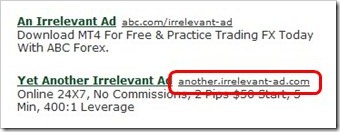
-
Image and animated gif ads
- Right click on the image or hyperlink and choose "Copy Link Location" (Firefox) / "Copy Link Address" (Chrome) / "Copy Shortcut" (IE) to get the URL.
- Paste it in Notepad or any text editor.
- Find the word “
adurl” in the URL.http://googleads.g.doubleclick.net/aclk?sa=l&ai= … [more letters and numbers here] … aExeA&client=ca-pub-4409443135154980&adurl=http://www.bad-ad.com/hobbies/store/uh_listCategoriesAndProducts.asp%3FidCategory%3D320&nm=4 - The URL following the “
adurl” query is what you want. Copy it.
-
Flash ads
At the moment, the only way you can find the URL is by using Firefox’s Firebug add-on. Use Firebug’s Element Inspection tool:
- Click the Inspect Element tool icon on the left side of Firebug menu bar.
- Hover the ad and right-click to highlight the embed code.
- Click Edit tab to freeze the code. The code should look something like this:
<embed height="250" width="300" pluginspage="http://www.macromedia.com/go/getflashplayer" allowscriptaccess="never" type="application/x-shockwave-flash" flashvars="clickTAG=http://googleads.g.doubleclick.net/aclk%3Fsa%3DL%26ai% … [more letters and numbers here] … sqw%26client%3Dca-pub-4409159435223980%26adurl%3Dhttp://bad-ad.com/home.php%253Flang%253Den" wmode="opaque" id="google_flash_embed" src="http://pagead2.googlesyndication.com/pagead/imgad?id=CICAgICQztDDdBCsAhj6ATIIJ7Yq_ZLoL-o"> - Locate “
adurl”, and copy the URL that follows.

2. Add the ad URL to Adsense filter
- Go to Adsense’s Allow & Block Ads page.
- On the left panel you will see a listing of your sites. Select the site/blog that you want to block the ad from. If you don't select any site, the ad will be blocked from all of the sites.
- Paste the ad URL into the text box under Advertiser URLs tab. It is best to block the entire site of the unwanted ad rather than just an individual page. So instead of using the full ad URL:
http://www.bad-ad.com/hobbies/store/uh_listCategoriesAndProducts.asp%3FidCategory%3D320
which represents only a page, it’s better to trim the URL down to block the entire domain, like so:http://www.bad-ad.com - Finally click the Block URLs button. It will start blocking after 30 seconds or so.
Enjoy!
26 comments to "How to block irrelevant or unwanted Adsense ads"
Thanks for the information, but I'm kind of interested as to how to put ads just above the comment section. Can you teach me how? or could you do a tutorial? Because I want to put ads on blog but I don't know how. I highly appreciate it if you could help me.
I did it!!!! I got to put an ad above my blog's comment. This is so great! I did it just like you did on your blog! And it works!
I am actually in need for this particular info. Good thing I had the chance to visit this blog, you really made this blog a good source of learning. I'll be checking out for more updates. thanks a lot and a job well done for you!
Thank you it really helps me to get more CTR
Thank you, nice tutor..i will be come back to see after my Google Adsense was approved. So hard to say for applying it :)
Should try this.
hope there will be more tips about adsense in this blog.
Great post. I was really wondering how to do this since my site seems full of useless stuff that don't relate to what my site represents. I'm glad I got to see this and I am so excited to try this out.
Great tips. I hadn't thought of using thre filter this way before 0I usually filter competitors
How we can remove unwanted ads from blog. But main problem is how we can save our adsense. Now a days google have very strict rules about google adsense..
Ohhh, this is a good one. It is actually a very helpful, and a good learning as well. It makes my work more precise and cleaner one. Good job on this!! I salute you on this.
Very nice blog.Great explanation about how to remove it.It is very helpful.Thanks for sharing your wonderful information.
Thanks.This will be really helpful to remove annoying ads
I am finding that if someone is using Google adsense (say for some months no problem and money increases double month over month) and then they sign up with advertising on Bing - even though Unique visits continues to climb, the adsense clicks suddenly drop by more then 60%!!! Nothing anyone can do I'm sure, which is why and how Google can do this crap, but I wanted to at least let people know what is happening. Its more then scammy its fraudulent! At least one website this is happening too is www.BridgeToRussian.com -FYI
I never thought it is possible to remove those ads. Those are really annoying. Thank you for a brilliant idea of coming up with this post!
I've always wanted to remove those unrelated ads on my site. Thanks to your guide, I have been able to do so. I never would have done it without you.
this is great since I like to remove those unwanted things on my adsense. And this is a learning post that you just created so kudos to you and your effort in sharing it.
I still get unrelated ads for my blog.. I guess Google have messed adsense up by introducing IBA. :(
@Jali
But you can filter IBA too right?
Greenlava,
The how-to you just shared is really simple and easy to understand. This is great stuff to learn. This informative post is very useful especially when taking out those ads that do not even relate to the products found on the site and just eat up good space.
nice post ,but can you tell me how to find cpc of ads which is showing on our blog
@Arun Rana
Click the Performance Reports tab on Google Adsense dashboard. You'll see CPC (along with others stats) displayed on the right sidebar.
It can be a constant battle trying to control the relevancy of your ads. It's a shame when Adsense is generally such a smart system that sometimes it serves up utter rubbish.
thats great !!!
I was looking everywhere on how to find the url of an offensive flash-based ad on my site. Firebug did the trick. Many Thanks!!
Hi, is there any way to block a specific ad in one of my sites but not another? You see, a lot of my blogs are in one adsense account.
Like for example one of your site is for children and you don't want dating ads there. But another site of yours has the topic of romance, and you want dating there.
Any help is appreciated.
@Blockbuster Diva
I don't think you can do that at present.
Post a Comment
We love to hear from you! Leave us a comment.
To ensure proper display, HTML/XML/Javascript need to be escaped first using this escape tool.