Creating Top Commentators widget for Blogger
Update 24 Dec 2009: I’ve just realized that the Blogger emits the maximum of only 200 comments per feed, even when I specified 1000 comments (using max-results=1000 query parameter). It wasn’t so when I wrote this tutorial back in June.
Anyway I’ve got the pipe fixed.
For readers who cloned my pipe, please re-clone. And for those who use my pipe as it is, you don’t have to do anything. The updated pipe will truly reflect your blog’s latest 1000 comments.
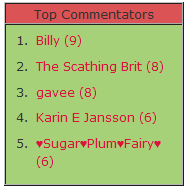 Improve traffic to your site by encouraging readers to leave comments on your blog. And what better way to motivate them to comment than to have their names displayed on your blog. Top Commentators widget will display the list of people who commented the most. Each name is linked to the commentator’s Blogger profile or web site.
See a live example here in my widget showcase blog.
If normal list like that doesn’t whet your appetite, try a cloud version, with Top commentators Cloud.
I. Installing Top Commentators widget:
- Login to your Blogger account.
- Go to Design > Page Elements.
- Click Add A Gadget.
- In Add A Gadget window, select HTML/Javascript .
- Copy the code below and paste it inside the window.
- Enter the title of your widget e.g. Top Commentators.
- Click Save.
<!-- Top commentators widget v1 Start -->
<script type="text/javascript">
function getYpipe(feed) {
 document.write('<ol>');
 var i;
 for (i = 0; i < feed.count ; i++)
 {
 var href = "'" + feed.value.items[i].link + "'";
 if(feed.value.items[i].link == "")
var item ="<li>" + feed.value.items[i].title + "</li>";
else
var item = "<li>" + "<a href="+ href + '" target="_blank">' + feed.value.items[i].title + "</a> </li>";
 document.write(item);
 }
 document.write('</ol>');
 }
 </script>
 <script src="http://pipes.yahoo.com/pipes/pipe.run?
 YourBlogUrl=http://www.bloggersentral.com
 &ExcludedNick1=Greenlava
 &ExcludedNick2=
 &ShowHowMany=10
 &_callback=getYpipe
 &_id=23022d7836bf2dd3c10a329feb9be26a
 &_render=json"
type="text/javascript"></script>
<span style="font-size: 80%; float:right;">Get this <a href="http://www.bloggersentral.com/2009/06/creating-top-commentator-widget-in.html">widget</a></span>
<!-- Top commentators widget End -->
II. Customizing Top Commentators widget
Notice the highlighted items in the code? That’s where you need to enter your own input:
YourBlogUrl–this is your blog URL, replace http://www.bloggersentral.com with yours. Remember: Do not include the trailing slash (i.e. .com/). This widget works for both blogspot and custom domain.ExcludedNick1andExcludedNick2–add up to two commentator nicknames that you want to exclude from the top ten list. You may want to put your nickname in here. The nickname Anonymous is already included in exclusion list, so you don’t need to add it here.ShowHowMany–specify how many people on the list, the default is 10.
This widget utilizes Yahoo! Pipes to extract and process the data from your blog’s latest 1000 comments, via comments feed .
III. Customizing the pipe (optional)
If you want further customize the widget output, you need to edit the (Yahoo) pipe itself. Follow the steps below:
- Go to my Yahoo! pipe here.
- Log in to your Yahoo! account.
- Create a clone by clicking the Clone button.
- Click edit source to edit it in anyway you like.
- When you’re done editing and saving, test run it by clicking Run Pipe button to confirm the output of the pipe.
- To use the pipe in the Top Commentator widget, you need to copy the id and paste it to replace the existing id in line 24. (To get the id, look in your browser’s address bar. The id is the end part the URL when you are viewing or editing the pipe.)
Credits to googlesystem, for providing the base for the pipe and to Hunlock.com, in helping me understand the process of importing and displaying Yahoo pipes in a web page.
Enjoy!
116 comments to "Creating Top Commentators widget for Blogger"
Hahaha! I'm a top commentator! Thanks this worked like a charm for me.
hmmm easy to install.
I followed the instructions and I changed the URL name on line 19 to my URL yet I do see the gadget on my Blog but no names under it although I have some comments.
joey perez,
Please read the proper way of copying the code in FAQs.
Thank you I got it to work...
Thanks for the useful information. Actually i also have a personal blog and i also need to install Top Commentators plugin in it.
Thanks
Thank you so much for this widget!
joey perez, UK Promotional Items, dBOS-fm,
You're welcome guys.
I'm good to go. I am completely blown away. I am quite impressed with your level of customer service.
hey! thank you so much for this! worked perfectly when I copied your code but when I tried to clone your pipe (wanted to add one more name to exclude), the list of top commentators doesn't produce accurate results. what am i doing wrong? :((
@K
What's your pipe url? Maybe I can have a look a it.
oh my gosh thanks for the quick response!
anyway, the clone's here:
http://pipes.yahoo.com/pipes/pipe.info?_id=73f917316c715ee26eb4329122fb89c2
i just added one more nickname, and it didn't work as it should. the top commenter should have 86 something points :(
thanks for trying to help! i appreciate it soooo much!!!! *hugs*
@K
I think I've found what the problem is.
You cloned my original pipe, not the updated one. It's not your fault though. Hmm strange, but anyway I think I've fixed that. Here's what to do:
1. Re-clone my pipe. You should see 5 URL builder modules in it, not one.
2. Add in the 3rd nickname. Do as you did before, it will work fine.
3. Tell me if it works
hey it does work! yay! thank you sooo much! i want to paste the link to the new clone but your comment box doesn't let me :(
anyways, i have added one extra nickname and plan to add up to 3K comments (for an ongoing blog contest).
a BIIIIGG thanks to you again! this is the only accurate pipe i have come across (and i have been looking for a long time now) ;)
kudos!
thank you.. its works! i like!!!
Hi Greenlava,
How do I remove the number of comments left by each of the top commentors, as I only want their names to appear? I took a look at the Yahoo pipe, but don't even know where to start! lol.
Thanks!
Farrah
@K
@Hajib
My pleasure guys...
@DISTRIKMODE
You need to clone and edit the pipe.
In the second to last module (Regex module), remove "item.title" rule by clicking the (-) sign. Then click Save in top right corner.
Don't forget to use the new pipe id number in your Top Commentator widget code.
Really nice with CSS ;) Thanks for the code.
IT WORKED!! THANK YOU SO MUCH GREENLAVA! :)
Thanks for sharring.. now I have the top commentors window in my blog!!! I love it!
@Anup @ Hack Tutors
@DISTRIKMODE
My pleasure
@Axes DesigNs
You're welcome, come back anytime...
I want this widget which exclude previous comments. Is it possible??
@Anup@ Hack Tutors
Take a look at this pipe.
http://pipes.yahoo.com/pipes/pipe.info?_id=6758a8ca9f56fc4ee15153f40f34e70e
I want to totally rest my top commentator widget in blogger. But it doesn't I have try to customize URL which you have given. It excludes but, it again include previous comments when they again comment on my blog...No solution of it? Can you give me full tutorial for it?
I am trying to do so I am organizing the top commentator contest on my blog. So, that's why I want to rest this widget...
Regards,
Anup kayastha
@Anup
I've revised the pipe. It should work fine now.
That's nice to read you blog as you continually provide great contents not seen on other site. Keep it up your site visitors will love your site a lot.
Very cool widget. I would like to exclude more than two commentors. We have five authors, plus some people who comment in multiple ways ... jason and Jason! It's the same person.
Anyway to exclude more than 2?
@Harvey44
You have to clone the pipe and add in Text Input modules. One module per person.
In Yahoo pipe editing screen, on the left, click "User inputs", then click the plus sign on "Text input" button to add the module. Fill in the blanks, drag to position and connect.
I would like to add links at the top of my blog using images I have created to match my blog how do I do that.
@Shannon
You might want to read Creating navigation or menu tabs in Blogger
Greenlava - at totally bizarre thing! I used the widget and modified it to eliminate Anonymous plus 5 other names. We have 5 authors. Also showing top 20 commentators.
Works great EXCEPT on my smart phone (Blackberry Storm 2) it shows the top 20 COMMENTORS from YOUR BLOG!
On a regular computer it shows the commentors from my blog. On my phone you are the top commentor with 361 comments!
WHAT???
@Harvey44
Now that's spooky :)
Frankly I don't the reason behind it. But you might want to try this:
Right now the YourBlogUrl text input module inside your pipe contains my blog url. Try replacing the urls (Default and Debug) with yours. That might do the trick.
That worked! (Thanks).
I admit I am clueless about pipes. I've ended up with 5 in there and want to delete all the false attempts. How can I figure out which ones to delete so I leave the right one?
Ignore my previous comment. I figured it out. Very Cool.
Is there any reason to put something in the spots above the Default and Debug where it says Name and URL?
@Harvey44
You mean Name and Prompt, inside the pipe editor?
Name for name of your variable (e.g YourBlogUrl). That same name must be used when you assign a value to the variable inside a script (as in line 19). If you don't define it, it will use whatever inside Default.
Prompt is your prompt text ("Your blog url"), only used in here
wonderful setup of your blog , i like it...
thx alot for sharing!
@Gagan
Welcome to Blogger Sentral...and thank you
@Endy Daniel
My pleasure, do come back :)
thanks for sharing its really helpful ... I used it =)
@w0rkingAth0mE
My pleasure...
Thanks for the tut on yahoo pipes. easily to follow.
thanks so much. i tried 3 other scripts and yours worked for me ;-D
@vvb32 reads
I'm glad. Thanks for commenting.
Hi, I wish to sort my Top commenters every month. How can I change the Date in your code?
@Mel Cole
You can get this widget with date limit feature added at Wahmaholic.com.
It works. Amazing.
tq :)
hello very nice widget man. I am using it on my blog at the moment. Have modified it jus a bit and thats jsu to show the word comments alongside the numbers. Is there a way i can add thumbnail or gravatar if u wanna call it that. For instance if the commentator has a blogger or openid etc profile then their pic would show. If not then a default pic would show instd. Thanx and looking forward to hearing back from you.
@Maestro
Sorry but I'm unable to offer you any help (due to my limited knowledge).
Being able to add a gravatar would be nice though.
Hmm....maybe I'll add it to my 2011's to do list.
Is there any reason to put something in the spots above the Default and Debug where it says Name and URL
@Roulette Online
You are referring to the pipe right?
Default is the default URL for the pipe. If you don't specify YourBlogUrl in code line 19, this URL will be used.
Debug URL is used when debugging the pipe. (There is a debugger at the bottom of the editor)
@Roulette Online
The pipe should work even if you don't put anything in the them.
I am using it on my blog at the moment. Have modified it jus a bit and thats jsu to show the word comments alongside the numbers.
@Promotional Merchandise
You need to clone and edit the pipe.
Then go to the last module (Regex), and replace (${y:repeatcount} comments) with (${y:repeatcount} comments) in the item.title rule.
very nice widget man. I am using it on my blog at the moment. Have modified it jus a bit and thats jsu to show the word comments alongside the numbers. Is there a way i can add thumbnail or gravatar...Thanks
@valentine gift 2011
I'm afraid that is not possible at this moment.
Thank you SO MUCH !!! I've spent HOURS tryin' every single widget like this one on every possible page and it wasn't working at all !! It was always showing a wrong comments number, but yours works !!!
I am SO happy :))))))))))))) !!!!
You can see it here http://www.l-iconoclaste.net/
wow…. very very very happy to see these extensions. i just wowed….wonderful to know . thank you so much....
Thanks for the useful information. Actually i also have a personal blog and I am always looking to get new quality plugins that can improve the blog's performance.
Thanks
Thank you for your instructions! And there are similar plugins for Wordpress blog?
Hello, I followed your instructions and it doesn't work for me. Only the title shows up with a few numbers. I'm sure it's something I am doing wrong and I admit I'm not good at this kind of stuff. Could you please help? Thank you.
http://expatandthecity.blogspot.com/
@Expat and the City
Those numbers are code line numbers. They appear if you copy the code direct off this page.
To copy correctly (without line numbers), you want to click the <> icon on top right corner and copy the code from the pop up.
for long time i'm looking for this widget. thanx dude. before this i'm already using this widget's script from another website but not working properly. name list of commentators dissapear only the counter have been show.
@redzuan
I'm glad this widget have solved your problem.
There are lots more widget tutorials in the archive. Do use the search box to find what you need.
Thank you again for excellent and clear instructions.
It worked for me.
the discussion here came to good result with a well and clear instruction... thanks for the author...
It WORKS!!!!!!!!!!!
Thanks you so much!@!@!@!
Thank you for your instructions! And there are similar plugins for Wordpress blog?
@Nil jhonson
How about this one here from WordPress Plugin Directory.
It worked immediately and it was very easy to put in. THANK YOU! :D Everywhere I looked, all I could find were widgets for Wordpress.
hi BS...just wanna ask,did it works to intense debate comments plugin? tq
@Munna
This comment numbering hack will only work with default Blogger comments.
Thanks :)
i love your widget very much~ tq
I have been using this widget for over a year now and suddenly out of the blue it has started to include my comments!
I have not changed anything in the code since initially implementing it. I have removed the widget completely from my blog and then added it again, but still the same problem.
Please help!!
@Carole in the Faith Lounge
This widget is case sensitive. Make sure your ExcludedNicks match exactly with the names you want to exclude.
Thank you, double checked and is now working.
This is awesome! Thank you!
cool widget ! TQ
How to add this kind of widget in wordpress based blog. Please answer my question... please
@raam
Wordpress has a plugin for this. Just Google "wordpress top commentators".
thanks I am using my blog now
Thanks brotha.. :)
Working great!!
cool widget! thanks...
works great! thanks!
You are awesome! I browsed to find a good js for this widget and your is the bomb! So clear steps, you are awesome! thnx!
Thanks....
I am glad to see that people are actually writing about this issue in such a smart way, showing us all different sides to it. You are a great blogger. Please keep it up. I cant wait to read whats next
It works for me, thanks a lot!
I dont know why, but it doesnt work :|
Ok, now works, haha, at last!!
I tried to install the widget. Thera are no problems with the instalation but in my site I can see only "Modifymyblogs" and nothing else.Thanks for sharing the information.
Awesome to be viewing your site again, it has been several weeks for me. Well this content that i’ve been patiently waited for such a lengthy time. I need this content to finish my task in the higher education, and it has same subject with your content. Thanks, excellent discuss.
please anybody. help. it doasnt work to me.
http://she-is-the-1.blogspot.com
i will very appreciate it if anbody can put this code together for me... :)
terima kasih buat artikelnya, inilah yang dari tadi saya cari
i want to make my blogs comments box , like yours...please tell me how i do it..i like yours comments...with numbers...thanks
Thanks....
Thanks useful widget. I had use it just second, and credit your link blog on my widget site.
Great thanks
TambelanBlog
@Ayodhya Prasad
Read this: How to number comments in Blogger
This is great post view to top commentator, top commentator is very important task of an offpage optimization.Thanks for sharing the useful information.
very interesting widget.
i want evry blog coments updates in my blog how to do???
@♛ ప్రిన్స్ ♛
You can use the Feed gadget to display 5 of your blog's latest comments, by using this URL as the feed URL:
http://YOURBLOGNAME.blogspot.com/feeds/comments/default
info is interesting for all of us bloggers especially beginners like me. thanks for the info tutorian a friend in the present. I got knowledge from here bari tricks about how to make the widget commentator on the blog.
Thank you so much! How to exclude third nickname? I have three nick ...
@Гала Германовна
You have to edit the pipe:
1. Clone the pipe.
2. Add an item (similar to the existing items) in the Filter module.
3. Add a text input module for inputting the nickname.
I did everything as you wrote, but the third nickname for exclude widget does not accept!
Auuuu & help me, please O-)
@Гала Германовна
Could you give me the ID of your cloned pipe?
Is it possible to change it the following way: I only want to see the top commentators of the last 30 days!
Many thanks!
@Marisol
Try the link provided in reply #45.
nice tips
Cool tips for making top commentator widget, thanks
It works...n easy..thank you so much...:D
Thank you so much! Works perfect!!!!!!! You are awesome :)
thanks... :)
Great widget. This widget let me identify top commentators and reward them.
Post a Comment
We love to hear from you! Leave us a comment.
To ensure proper display, HTML/XML/Javascript need to be escaped first using this escape tool.