Add Twitter tweet button to Blogger posts
This time we will show you how to add the official Twitter tweet button to each Blogger post. This button will let people share your posts without leaving your blog, similar to the TweetMeme retweet button. However, it comes with a few additional features worth considering.
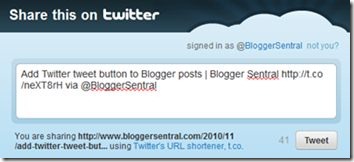
The one feature that I like most about Twitter tweet button is that you can choose to recommend up to two Twitter accounts for sharers to follow after they share content from your blog. These accounts could include your own, or that of a contributor or a partner. It’s a great way to promote your accounts and increase followers.
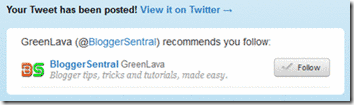 |
Twitter recommending to follow the selected user
It will also automatically shorten the URL using Twitter’s t.co URL shortening service.
I have modified the button’s original code to make it detect the correct post URL and post title even when you click the button on a page that shows multiple posts i.e. home page, label or archive page.
Now let’s install the button:
- Go to Dashboard > Design > Edit HTML.
- Back up your template.
- Tick the Expand Widget Templates check box on top right of the HTML window.
- Find the following line of code in your HTML, this is the code for your post content:
<data:post.body/>
- Paste the button code immediately below (after) that line:
<!-- Twitter tweet button Start --> <b:if cond='data:blog.pageType != "static_page"'> <div style='text-align:left;padding:5px 5px 5px 0;'> <a class='twitter-share-button' data-count='vertical' expr:data-text='data:post.title' expr:data-url='data:post.url' data-via='BloggerSentral' data-related='' href='http://twitter.com/share'>Tweet</a> <script src='http://platform.twitter.com/widgets.js' type='text/javascript'></script> </div> </b:if> <!-- Twitter tweet button End -->
- Button configuration
Choose the type of button and follow recommendation by changing the value of the respective attributes in code line 4.
Button type Attribute Value 
data-count vertical
horizontal
noneFollow recommendation 1
data-via Your Twitter username Follow recommendation 2
data-related Second Twitter username - Button placement
The steps above positioned the button on bottom left of each post. To change the button position, do the following:- Position it on top of post
Instead of after<data:post.body/>, place the button code before . - Position it on the right
Change thetext-alignin line 3 fromlefttoright. - To display the button in static pages as well, remove the conditional tag –in code line 2 and 7.
- To display the button only on post pages, replace conditional tag in line 2 with this:
<b:if cond='data:blog.pageType == "item"'>
and removeexpr:data-text='data:post.title'in line 4.
- Position it on top of post
- Preview, you should see the button appear in each post.
- Click Save if you like what you see.



Problem with apostrophes in post titles
As pointed out in the comments, there is a problem with post titles that use apostrophes –only the text before the apostrophe shows up, followed by a backslash.
From my observation, the problem is due to the inclusion of the expr:data-text='data:post.title' attribute. Removing this attribute should eliminate the problem.
However before you hit that Delete button, consider this: without the data-text attribute, you will encounter another problem –when you click the button on a multi-post page, it won’t post the post title. It uses the blog title instead, bummer.
Enjoy!
60 comments to "Add Twitter tweet button to Blogger posts"
Useful post...I want to place tweet button like as in http://www.spoilertv.com . In that website it is placed on right side of post title. Please tell me how to place like it.Thanks
AWESOME. Thanks for the info and I will be adding this as soon as Cyber Monday is over. Thank you!
@Belly Charms
Great.You're welcome.
@Venu
Place the code right before this line in your template:
[h3 class='post-title entry-title']
and you want to replace code line 3 with this one:
[div style='float:right;padding:5px 0px 5px 5px;width:60px;']
Hi Greenla,
Thx your for the tips,
I can not properly align the three icons facebook, twitter, google buzz (see my post at the following address: http://www.tweakyourdevice.com/2010/12/nouveau-message-test.html )
Here is the code I put for now:
div style='float:right;'
Thx you in advance
As I've changed my Retweet button to Tweet button (though they're the same), this site give simple and detailed instruction. Thanks for this post, very useful. I've bookmarked it for future references. Great site indeed.
@Antoine
You want to put each button inside a div tag and vertical align each button using margins:
[div style='float:right;margin:Tpx Rpx Bpx Lpx;']
BUTTON CODE
[/DIV]
T --> value of top margin
R --> value of right margin
B --> value of bottom margin
L --> value of left margin
This is very helpful and clear. The one remaining issue for me is that, for all posts except the current one, I use the page break/read more feature. I would rather the tweet button appeared after the "read more" hyperlink, but am not sure where to place it in the HTML code. Can you advise?
@Raining Acorns
A few lines below [data:post.body/], you should see this code:
[b:if cond='data:post.hasJumpLink'.
[div class='jump-link']
[a expr:href='data:post.url + "#more"' expr:title='data:post.title'][data:post.jumpText/][/a]
[/div]
[/b:if]
you want to paste the Tweet button code right below it.
Thank you! This went exactly where I'd hoped.
I wish to include the body of my post in the tweet and not the title. I changed the data:post.title tag in the given code to data:post.body but that just gave me the div and span tags with the post text. Is there any way around that?
Thanks!
@Siddhartha Ghai
None that I could think of, sorry :(
Hi Greenlava
your post is useful,
my question is how I can replace facebook share button near Twitter button on the right side on the same line, (I tried to put both of them in the right side but one of them shows at the next line)
thanks
@Layla Abdo
Replace text-align:left; code line 3 with float:left;
I'm using TweetMeme plugin for WordPress. My tweet was not counting after pressing tweet button. What is the problem likely occurs
@akubiomed
WordPress eh? Hmm...I've retweeted on of your posts, but somehow the URL didn't register.
Why don't you try adding the button without using a plugin?
Can you help me figure out how to put a space between the Facebook and Twitter share button and my blog posts? Right now, they're way too close together and I've been trying for a while to put a space between them but nothing works! Thanks so much. You can see here: http://thislittlepiglet.blogspot.com/
I just put a break in the post html, and that worked, but am wondering if there is something I can put in the template code that will automatically insert the break every time...
This post has helped me so much. I don't 'speak' html, but with clear instructions like this, I got the code to do what I want on my blog in very little time at all. Thanks again! =)
Thank you so much for this. I've been searching far and wide for a clear instructional post on this and couldn't find any. Thank you for including this.
details info about tweet button, im looking for tweetmeme button this info helps a lot..tq
@Tami Marie
@apaajanews
You're welcome.
There are a lot more tutorials waiting to
be discovered :) Browse the archive or use the seach box to find them.
Tweet count isn't working? I'll tweet and immediately afterward number will go back to zero. Please help.
neither is my tweet count working :( same as previous comment
@Anonymous
@Marie Claire be
Seems to be a glitch or delay in Twitter cache update.
I've tried tweeting Twitter developers page using their own on-page button...same result.
Thank you! That was very helpful! www.findingshibusa.com
This was very helpful. Thanks. But there seems to be a problem with post titles that use apostrophes.
http://www.redbullandpoker.com/2011/05/when-matt-ridley-and-joe-rogans-ideas.html
It cuts the title off at the apostrophe and inserts a slash.
hye.. i googled up " how to add tweet this button on ur blog" and found this page and i also read ur tutorial on putting "share" button as well.. i'm not really good in HTML codes... i want to know how to put both button align but i dunno the value of the margin.. can u help me somehow?
Greenlava: I'd be interested in hearing your thoughts about apostrophe's in titles not working with the tweet button (as anonymous posted above).
@LeClerc
Post updated. I've added something on the matter.
Hi Greenlava,
I would like to place three buttons (Facebook, Twitter, +1) all next to each other at the top of my Blogger posts. The first one inserts fine, but then the second sits way over to the right (changing text-align or float to 'left' doesn't move it? :s And the third one just goes on the next line down.
Can you help please? :)
Thanks,
Andrew
@Andrew
What's your blog URL?
@Greenlava, my blog is http://www.3dsfocus.com
I currently have Twitter and Facebook buttons at the top of each post, but I would like to add more. Thank you for your help :)
@@Andrew
You have to reduce the width of the Like button's iframe. Right now you set it to 450px. You can safely reduce it to 90px (since you've chosen button_count layout).
@Greenlava
Thank you for your reply. I have reduced the width of the Twitter iframe and added the code for the Google +1 button, but it does not sit in line with the others correctly. Can you take a look and see if you can help, please? :)
Thanks,
Andrew.
@Andrew
Which blog?
@Greenlava Sorry, it's www.3dsfocus.com again :)
@Andrew
Try changing the padding from 10px to 5px.
I spent HOURS googling how to get social media share buttons on individual blog posts and couldn't get it to work. Finally I found your blog post. Thank you! You may have saved my sanity.
yup..
this tutorial really works. thank you!
Thanks for sharing your tips!
Thanks for sharing it
I'm trying to get my facebook and twitter to be next to each other and i've tried and tried.. what do i need to change? THANKS!
www.hookedonhouse.com
@DJ St1cK E
Add style="float:left" to the Like button div tag.
i do have to say though.. i've written the html to automatically center the photos in my posts, and now it looks like the float left solution pushes the pictures over? any fix for this? Thanks a ton
@DJ St1cK E
You can fix that by adding a line break right after the div that's holding the Tweet and StumbleUpon button, like this:
[div]
TWEET AND SU BUTTON CODES
[/div]
[br/]
I have come back just to say hi :) I edit my blog, and hv to reinstall my tweet button, here i come looking for reference. tq, keep up the good work.
-Honeybee
http://www.healthybeautifulblog.blogspot.com
data:post.body does not exist in my html
@Bob Campbell
Have you checked the Expand Widget Templates checkbox?
Heya, Very very helpful thank you so much!!
just one question: I managed to edit and put the FB like and twitter ones on the same line, but the twitter one is a bit off? like it sits too low, and also would like to make it be further to the right.
Can you help me w/ that? to see what I mean:
http://7randomthoughtsbeforebreakfast.blogspot.com/
@Condra
Wrap your Like button code in a div tag, like so:
[div style="padding: 5px 15px 0px 0px; float: left;"]
[PUT YOUR EXISTING FACEBOOK IFRAME CODE HERE
[/div]
Thank you so much!! much appreciated it works like a charm :)))
I can't get my buttons to go on the same line, and I tried what was mentioned above (at least I think I did it right). Can someone explain how to fix this?
Here is a link: http://lifeinfullswingblog.blogspot.com/
@Jacquelyn
Refer to this post: Aligning Google +1, Tweet and Like buttons horizontally
This was SO helpful! I followed it step by step and added the Tweet button! Thank you so very much!!
www.thesilverkickdiaries.com
thanx alot such a valuable info !!
THANK YOU THANK YOU, I had tried adding a button before and it worked, but it recently started receiving cross-script errors. THIS CODE WORKS!
THANK YOU!!!! it worked on my blog :) awesome tutorial..
@Greenlava. Great post - very useful - thanks! Many of the comments and responses have also helped me too. I was just wondering, is there any way of making the twitter button only appear in the expanded blog post (once they've clicked 'read more') and not below the previews?
@Sam O'Flaherty
Use "item" conditional tag: Targeting specific pages/URLs with conditional tags
Post a Comment
We love to hear from you! Leave us a comment.
To ensure proper display, HTML/XML/Javascript need to be escaped first using this escape tool.