The easiest tabbed content widget for Blogger
There are quite a few tutorials out there that show how to create tabs with CSS and jQuery. However, most of them require you to modify your blog template codes. On top of that you also have to manually add the content of each tab.
Fortunately, with this tutorial you don’t have to go to all that troubles. All you have to do is add our tabber code into a HTML/Javascript widget. Once added, it will transform your Blogger blog’s existing widgets into tabs, automatically!

See the demo here.
Below are some of the features of the tab content box:
- Accommodates unlimited number of widgets.
- Keeps the tabbed widgets’ original appearance.
- Fully widgetized for ease of installation and removal. If you don’t like what it does, simply remove the HTML/Javascript gadget.
Installation
- Go to Layout and click an Add A Gadget.
- Select HTML/Javascript widget.
- Leave the title box blank.
- Copy the code below and paste it inside the content box.
<style type="text/css"> .tabber { padding: 0px !important; border: 0 solid #bbb !important; } .tabber h2 { float: left; margin: 0 1px 0 0; font-size: 12px; padding: 3px 5px; border: 1px solid #bbb; margin-bottom: -1px; /*--Pull tab down 1px--*/ overflow: hidden; position: relative; background: #e0e0e0; cursor:pointer; } html .tabber h2.active { background: #fff; border-bottom: 1px solid #fff; /*--"Connect" active tab to its content--*/ } .tabber .widget-content { border: 1px solid #bbb; padding: 10px; background: #fff; clear:both; margin:0; } .codewidget, #codeholder { display:none; } </style> <script type="text/javascript" src="http://ajax.googleapis.com/ajax/libs/jquery/1.6.0/jquery.min.js"></script> <script type="text/javascript" src="http://greenlava-code.googlecode.com/svn/trunk/publicscripts/bloggertabs0.1_min.js"></script> <script type="text/javascript"> $(document).ready(function() { $('#codeholder').bloggerTabber ({ tabCount : 3 }); }); </script> <!-- to make sure the widget works, do not alter the code below --> <div id='codeholder'><p>Get this <a href="http://www.bloggersentral.com/2011/05/create-tabbed-content-blogger-widgets.html" target="_blank">tabber widget</a></p></div>- Code line 34 is for loading jQuery library. Remove this line if you’ve already loaded it somewhere else in your blog. Hint: If your blog has a slider, cycler or something with fading effect running, chances are it is powered by jQuery.
- Specify the value of
tabCountin line 39. This value equals the number of widgets (underneath the tabber widget) that you want to turn into tabs. - The default box background color is white (#fff). You can change it in code line 25. Apply the same color for the active tab’s background and bottom border (in line 19 and 20).
- Position the HTML/Javascript gadget above the gadgets that you want to tabify.
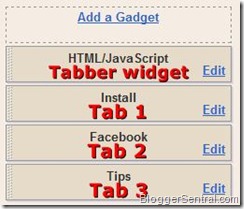
- Click Save and view your blog.

Post-installation
- Make sure you title each widget that you want to tabify. Tabber won’t work properly without widget titles.
- Reduce tab widths so that all tabs fit into a single row. This can be achieved by using short widget titles.
- You may need to reduce the widths of the tabified widgets to fit them into the box.
- Don’t forget to test in Internet Explorer. This widget may cause “Operation aborted” error in IE for some non-designer templates. If that’s the case, this widget is not for you :(
Enjoy!
158 comments to "The easiest tabbed content widget for Blogger"
Do you have a demo of this?
Thx for info :)
Nice This post i place in my blog later,
Cute ;-)
Cool tip though. Definitely one I might use in the future.
@Anonymous
I've added the demo link.
I didn't get how to add the name of the gadgets to the tabber - I lined them up, the tabs showed up, they worked but it was all was whited out. Love the idea as I get tired of scrolling; my next step would be to put in "back to the top" code - somehow. Thanks.
@Roberta @ Silverwalk
The tabber copies the titles of the gadgets. That's why you have to title each widget.
As I came back to check for an answer, I looked more carefully at the tabs and realized just what you told me; I then changed the colors from #fff to ones that better fit the current colors of my blog. THANK YOU. This is SO cool :).
@Roberta @ Silverwalk
You're welcome :)
Thanks for this. I like it.
Thanks for the tutorial Green Lava, is there a WordPress plugin available for this.
I am new to blogging and for the life of me could NOT get this to work! The "tabs" did not show up as tabs, but rather stacked blocks. What am I doing wrong??
@Amy Sue's Place
I'm guessing the tabs are too wide?
@Naser
If I'm not mistaken there is a plugin called wooTabs. But it comes with premium wooThemes.
Hi,
That is THE widget I was looking for !! The best, easiest ! Thank U so much
You have a great tutorial, this is what i waiting for :D
I have a question
There is any way to put the tabs verticaly not orizontaly (verticaly to left)?
Hello Greenlava,
great Job, thank you! But unfortunately, the widget has a bug. When you link to a single post or you want to write a comment, the widget chrashes the layout or the comment function. Take a look at here: http://goo.gl/XWRqw and this is the Blog: http://goo.gl/anMJl
Could you fix it? Thank you!
@oliver
Are you sure it's caused by the tabber?
Try removing the tabber widget and see if the layout returns to normal.
@ greenlava
You're right, the tabber worked well, it was a problem of my own code. I fixed it. Thanks for feedback.
can this be added to post ? i.e. i have posts which r very long...will this tabber accomodate in a post ? I will be able to post then as one whole post with tabs as parts of the post ?
@श्रेया
I'm afraid you can't. It's specifically designed to transform widgets into tabs.
Hi
I have a question:
Is it possible to use more than one tabber per page?
For example, like in two different sections on my right sidebar...
If this is possible, do I just copy and paste the code twice in two different locations?
Thanks
@TBB
No, that's not possible.
Thank you Thank you Thank you so much. The code worked perfectly. And best of all it was so EASY !
I like this post & will to use for my blog
Useful tips! LOVE :)
This is really helpful, makes your blogger blog wordprss like look.
In return, i advice you to get logo for your blogger blog. check out favicon in blogger blog
Is there anyway you can put images in the place where the title of each tab are? Thanks!
Awesome, but can we change its color theme in to dark??
@Kristin Youngblood
Sorry there's no option for that at the moment.
@Nimila Zamz Hiran
Yes you can change the colors, but you have to do it manually.
Hi - I love this it worked fine and this morning it won't work anymore in my blog.. DO you know why??
http://purplerosy.blogspot.com
@Rosalie
This is a portion the tabber code from your blog:
[script type="text/javascript"
src="http://ajax.googleapis.com/ajax/libs/jquery/1.6.0/jquery.min.js"]
[script type="text/javascript" src="http://greenlava-code.googlecode.com/svn/trunk/publicscripts/bloggertabs0.1_min.js"][/script]
Something is missing in the code. Can you spot it?
.
.
The first script tag is not closed. The correct code should be like this:
[script type="text/javascript"
src="http://ajax.googleapis.com/ajax/libs/jquery/1.6.0/jquery.min.js"][/script]
[script type="text/javascript" src="http://greenlava-code.googlecode.com/svn/trunk/publicscripts/bloggertabs0.1_min.js"][/script]
Thanks - I don't know how that got changed but I fixed it. I love your site by the way. I have learned a lot from you.
Have a great day :-)
Sir. Me new. Learning a lot here. Query: Any easiest way to change the number of sidebars from 1 to 2 ? With high regards.
@Ifinder
You can do it easily enough in Design > Template Designer > Layout.
I just wanted to say that I really enjoyed this post. You make some very informative points . Keep up the great work!
Hi, this I can't see the demo.
@otobong
Here's the demo link again.
Thank you Thank you Thank you so much. The code worked perfectly. And best of all it was so EASY !
I like the post, I'm learning it now, helpful,thank you
आभार इस सुविधा के लिए
@Abhishek
Each widget that you want tabbed must have a title, otherwise the tabber won't work (properly).
HI dude,
thanks for this post... i burned my head many times trying to find it and many of the codes i found it was so complicated... but this works nice.
thanks
yess , like it
greenlava, ive tried renaming the tab content, and updated the total tab, but i still couldnt do it.
any ideas?
the link is fahmimahat.blogspot.com
tq in advance ya =)
@Fahmi Mahat
You have double jquery library calls -one in this widget and the other one is for LazyLoad. I believe that's causing the problem.
I suggest you delete the one attached to the LazyLoad script, i.e. this line:
[script src='https://ajax.googleapis.com/ajax/libs/jquery/1.4.4/jquery.min.js' type='text/javascript'][/script]
thanks brother for this very useful blog
tq greenlava~ :)
My tabs are overlapping! Any tips? :(
@Glebber and Symphony
It looks fine from here.
Oh I fixed it... thanks! :)
thx u
can i build 4 tab..?
@Bloggerizqy
Yes you can. Just set tabCount (in line 41) to 4.
thanks for article, i like this widget...
Great tips!Looking forward to using them!
my tabs are overlapping :( i tried to shorten the widget title but still it won't work here is the link http: rizqiarifuddin.blogspot.com
@Rizqi Arifuddin
Replace the CSS portion (the one inside [style] tag) of your code with this:
.tabber {
padding: 0px !important;
border: 0 solid #bbb;
}
.tabber h2 {
float: left;
margin: 0 1px 0 0 !important;
font-size: 12px;
padding: 2px 3px !important;
border: 1px solid #bbb;
margin-bottom: -1px !important; /*--Pull tab down 1px--*/
overflow: hidden;
position: relative;
background: #e0e0e0;
cursor:pointer;
-moz-border-radius:5px 5px 0 0;
border-radius:5px 5px 0 0;
}
html .tabber h2.active {
background: #fff;
border-bottom: 1px solid #fff; /*--"Connect" active tab to its content--*/
}
.tabber .widget-content {
border: 1px solid #bbb !important;
padding: 10px !important;
background: #fff;
clear:both;
margin:0 !important;
}
.codewidget, #codeholder {
display:none;
}
Zillion thanks :) now it works cool
Thanks for sharing the code.
nice articel, and nice for my blog, ty.
I added the code to a widget in my layout design, but totally can't figure out how and where to label the tabs. Could you help a computer challenged a bit more pretty please!!!
@Aimee - ItsOverflowing.com
The labels are copied from the widget titles, so make sure you put the title on each widget.
Hello!
This feature is working fine on firefox and chrome but doesn't work on internet explorer.
Could you please help me to solve this question?
Thanks,
Ana
This is perfect! I had no issues adding it to my blog, however when I try to add it a second time in another location on the page, it does not work - is there a tweak I need to make to the codes to have it multiple times or do you have any suggestions?
Like this, and Like it..
finally, i find it. without makes change html code.thanks for the code. thanks very much
@Kate
At this moment the code is good for one unit only.
love this... ^__^
thanks,, easy to use, and suitable with my blog template..
may I copy this trick to my blog?
@Andreansyah
Yes you may as long as you link back to this post.
That is THE widget I was looking for !! The best,
easiest ..Thank
thank you!
beautiful....worked like a baby!:) thank's a lot!
http://www.noutatimedicale.com
thank u.......
love love love this! keep up the good job!
Awesome as always but I have a question regarding what you put in those tabs. In your demo, you have "tips", I want to do something similar where I use all the posts that have "tips" as a label and put the link to those posts in there. I only know how to put the entire post in there, but not just the URL - any tips?
Thanks for the tutorial! I'm new to blogging and this was a big help!
mscandmisse.blogspot.com
mantap juga nih tai di aku mah ngga pake yang ginian karena ngga ada sidebarnya :P
Hmmmm, I will definitely use this in the future. Great widget!
hey will you tell me after adding this what i do to make it tabular just putting other javascript box below this or any thing else please mail me dklove84@gmail.com
Is there a way to put 'recent post,popular post and recently commented post'widgets in this tab widgets?
btw,nice tutorial!!
This was very easy to use thank-you :)
Thank you Very Much..... thanks for publishing
Is there a way to center this in my sidebar?
Hi, I already have JQuery on my blog, so deleted line 36, but it doesn't seem to work at all, any ideas?
Hi. I was so thrilled with your FB Like coding (worked great!) that I tried this one and the Post Titles widgets. Neither of these work for me. When I paste the code into a widget HTML/text box just the code is displayed. Thanks for your help on this.
@Natalie
Try this:
1. Insert this property after line 4:
text-align:center;
2. In line 7,replace:
float: left;
with
display: inline-block;
@Scarlett Rains
I don't see the widget in your source code.
This is a very good widget and can save a lot of space on your blog. It is more useful where you want more and more widgets in less space.
Thanks for sharing the code for this widget. I will try it soon and let you inform the results.
Great man, I cant find any words to express. I have been going through the comment sections, I'm really impressed by your prompt reply. Very good blog.your widget was a wonderful thing, i have already applied that.but could not figure out how to put all the 4 tabs in one row.
@Ben Jamir
You just have to squeeze them in, by choosing a narrower font, smaller font size or reducing the padding.
Try this, replace code line 9 with:
font: 12px "arial narrow";
So far so good this is working beautifully on my blog!!
I like it and i placed in my blog. Thanks for the tutorial
Thank you so much. It helped me once and when I made some changes, it didn't not appear. Please guide me what to do further.
Thank you, this is great!
¡Espectacular! Saludos desde Argentina ^_^
how do you change the color? I know it needs to be done manually, but for example if I wanted purple what do i put in place of the fff? My About Me tab shows my profile picture, but nothing else can you help me with that? http://lefthandedides.com
Hi Greenlava; i had previously set css properties in blogger template designer. I notice it doesnt allow the css in (the style section of) your tutorial to work.
I have tried all my best but it just isnt working. Pls what do i do? My blog is linked thru my name above i.e Tony Iyke. Thanks
Hi Greenlava; i had previously set css properties in blogger template designer. I notice it doesnt allow the css in (the style section of) your tutorial to work.
The issue is the tabs are constantly highlighted; whether they are active or not. How do i give the active tab a different color from the inactive tabs?
I have tried all i know; including editing the css i added in template designer and also editing your own that i added into HTML/JAVASCRIPT gadget but none is works without affecting other gadgets on my site. So am at my wits end.
Pls what do i do? My blog is linked thru my name above i.e Tony Iyke. Thanks in advance
I have tried so many different codes out there and it never worked. I am thinking maybe because none of the tutorial mentioned that the widgets need to have a title. Your tutorial worked like a charm. My only question is about the 'Get this tabber widget' at the bottom and why it is written twice. I have no problem giving credit where it is due, but having that phrase written twice It looks goofy a little goofy.
Chances are I did something wrong. Here's the link to my blog, if you wanted to take a look and see what I am talking about:
http://hip2thrift.blogspot.com/
Thank you for such a good tutorial. Sticking around to see what other cool things you have around!
@Iuliana
I see two sets of tabber widget codes in your template. You need to remove the one at the bottom of the sidebar.
Looks like this is great idea to implant such widget in blog.
I have followed all instructions but don't know why my tabs are grey and without text. I have added Titles to my three widgets, but still no go. I've tried to change the #fff to match the green on my blog and it's still greyed out... any help would be great. A designer went in and played with the CSS when she designed the blog, so I don't know if there is something in the Template that is messing with your code. http://pintsizedbaker.blogspot.com/ Thanks
Thank you so much for such a great widget. I am in the process of setting up my blog and this is a great addition to it. However I do have a question. I went through all of the comments hoping that I could find the answer but I didn't have any luck. The question is: how do I change the font-type? Currently it is in all caps and I wanted a font with a little more style. You can checkout what I mean @ http://flusterbuster.blogspot.com/.
Thank you again
@Pint Sized Baker
The color of the titles is set to "transparent" that's why you can see them.You set the h2 text color to transparent.
To fix it just insert a color property for .tabber h2 selector ie. insert the following line anywhere between line 6 and 17.
color: #8db24e;
(replace the color code with your color of choice)
@Robin
Your changes involves .tabber h2 selector also.
To lose the caps, insert this line:
text-transform: none;
and to change the font, add this:
font-family: Verdana, Arial, sans-serif;
(replace the font names with your preferred fonts, beginning with your first choice, followed by your second choice and ...)
Hi! this widget is great, but how do I add other widgets underneath it without them being added to the tabs? Thanks!
@Amy
The tabber only transforms fixed number of widgets as specified by tabCount (in line 39). Anymore widgets added below the last widget will not turn into tabs.
Help. I love this idea, but don't know how to match the tabs to the code. I am not technically. Obviously. Can you tell where I've messed up??????????? I placed the widget at the top of my sidebar. Thank you for any help!
http://kimberlys-cup.blogspot.com/
It doesn't work for me (+______+)
@Kimberly
It looks like you forgot to put the title on your Pinterest Follow button widget.
Woohoo! Thanks for your help! Works great!!!!!
Hello there! I tried to add this to my page, & it doesn't show up at all. Is this compatible with Dynamic View pages on Blogger?
Krys @ Keeping PLUS in a MINUS World
So, I have commented before how this had worked well for me. Well, after making a few changes to the blog and then getting tired of the mess I made, I uploaded a template I have used before I had installed this widget. Anyway, now when I try to do it, it just won't work for me at all. Any ideas? (i did name all the tabs, I made sure I have jquery library)
@Iuliana@Hip2Thrift
I only see code line 44 and 45 in your template. Where are the rest?
@Krystal Lynn
No, this widget does not work on Dynamic View templates.
how can i add a other widget below this tabbed widget. I mean i dont want all widgets in sidebar to be tabbed some of the widgets should be seprately displayed . is this possible?
@Techonicals
Yes that's possible. This widget only converts x number of widgets as specified by tabCount. The rest of the widgets are left untouched.
Hello, I love your blog, but more so, found this widget on another person's blog. I have no freakin' clue what I'm doing wrong. I have installed and reinstalled several times. I removed the line 34 then added it back in and it doesn't make much difference. My code is located on lower right sidebar of my blog which is attached to my name here. Help!
@Cindy
I don't see code line 45 in there. You need to include that line for the widget to work.
ok. i love to try this tabbed.
thanks :D
thank you very much
thank you very much, It's very simple and beauty..
Hi... I have tried to add this element and for some reason it doesn't show up at all. I added the code, and also removed the piece for jQuery. I've done it with and without that piece of code. Am I missing something else? I see nothing.
@thediynurse
Yes you're missing the original link to this tutorial in line 45. Just replace the link to the copy-paste tutorial with the original one.
hi..Nice widget!
i've tried so many time to add this widget to my blog. Follow each step you told. But it still doesn't work..
i've spent more than 2 hours just to make it work but still fail..ohh plez tell me how to fix it??
@itu Akhil
I notice you put different values for script's type attribute.
You need to change them back to the correct value, which is "text/javascript".
Would this coding work on Wordpress? or do you have a specific WP version?
@Emily
This only works on Blogger. Sorry, there is no WordPress version at the moment.
It works for me:)
your blog looks simple but really rocks.I becamed a biggest fan of your blog:)
it works .. yeah thanks a lot
Great, it's work like a charm in
regards,
singachu
This was working well for me and then suddenly doesnt work anymore. I didn't mess with the code. I dont understand what went wrong.
@Shaina A.
I notice you have two jQuery calls in your source code.
You need to remove either one (hint: Scroll To Top button).
Thanks so much, that did the trick!
love it! two questions:
is it possible to round the top edges of the tabs?
is is possible to have the tabs be taller and narrower to accept longer titles with text wrapping?
Many thanks for this great tool!
Thanks so much for this, it's awesome! :D
My tabbed widget has also stopped working. As far as I can tell I only have 1 jquery call. Not sure what happened?
@Michele {The Scrap Shoppe}
Move the jQuery call from your existing location (near /body tag) into the tabber widget.
@Colleen
Add these declarations to .tabber h2 selector, by inserting this after line 16:
border-radius: 5px 5px 0 0;
-moz-border-radius: 5px 5px 0 0;
-webkit-border-radius: 5px 5px 0 0;
width: 60px;
finally it's work..
tq a lot for this awesome widget^_^
Nice Info.. thanks..
Visit back
I love the idea of this widget, but I can't get it to work on my blog though I've tried several times. Please let me know what I've doing wrong.
@Bonny @ thedomesticatedprincess.com
You have two jQuery library calls in your blog -one for tabber and another one for pin hover button. You need to remove one, perhaps the one that came with the hover button.
hi, i use blogskin, can i do like that too ?
@siti shahirah alimin
You can't if it uses Classic Template. This tabber is designed for Layout Templates.
I cannot get this to work on my blog (it is in the left sidebar.) Is something missing? I'm at a loss!
yeah..
this is the awesome information..
thank you for the information..
Hey Greenlava...i have installed the widget and it works great...thanks for the tutorial....however,i have an issue with the dates of my postings....next to where the widget is located....i have set 4tabs....as a result the first 4 postings are sharing the same frame with only one posting date....
Is there anyhow it can be fixed?...Thanx a million man...peace!
@Boikot CinaDAP
It's not caused by the tabber widget.
Your latest 4 postings were posted on the same date (July 5th), that's why they share the same date frame. That's how the date header works. The same goes to the 4 older posts (July 3rd).
Only on the next older posts will you see different date frames (July 3rd and 2nd):
http://bbcdrasmi.blogspot.com/search?updated-max=2013-07-03T03:40:00%2B08:00&max-results=5&start=5&by-date=false#sthash.PsbU6f0E.dpbs
"Make sure you title each widget that you want to tabify. Tabber won’t work properly without widget titles." I dont understand about this. Can you explain or give some sample. I already try many time, but still not appear at my blog. http://nurshahmina.blogspot.com/
@Irma Yante
It looks like all your widgets have a title, so that is not the cause of your problem.
The reason the tabs don't appear is this: You place the tabber widget (the HTML/Javascript widget that contains the code) underneath your widgets. What you should do is place it above the widgets you want to tabify. Read step 5 of the tutorial.
@Greenlava Thanks for this awesome widget. I am using it on my blog and it is doing well.
I have used stuff from your site before with success. THanks so much for all the awesome work you do!
However, I have tried over and over to get this to work without success. I made sure each widget had a title, changed the number of tabs to the correct amount, and tried it with and without the jquery part of the code. No success. What am I doing wrong?
http://thecraftpatch.blogspot.com/
Okay, you are going to think I am an idiot. I've got all my problems solved. Both the tabs and the pinterest hover buttons are working perfectly. THanks so much for your awesome website!
This is one cool tabbed view widget.
After reading through all the comments above, I found the source of the troubles and all is well. This is exactly what I was looking for and it works beautifully! Thank-you!!
Comments on this post are closed.