Simply faster free Blogger template
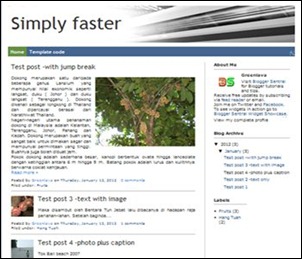
Simply Faster is a super fast Designer template, with several added features not available in default templates offered by Blogger. This is BloggerSentral’s second Blogger template; the first one was Tinted Panes.
Features
This template comes with a these extra features:
- SEO optimized page title, as explained in SEO friendly Blogger page title.
- Auto read-more (expandable post) with thumbnail on multi-post pages
The auto read-more uses Blogger generated 72px x 72px thumbnails (instead of resizing big images into thumbnails), loads only short snippets instead of whole posts and doesn’t use Javascript.
All of these translate to smaller page file size, which means faster loading speed and increased number of posts (because it is less likely to trigger auto-pagination). - The most recent post display in full on homepage
On homepage, the most recent post will appear in full, to make it stands out from the rest of posts. You can limit how much content to show on homepage by applying Blogger’s jump-break. - Header for label-search and archive pages
Comes with page header at the top of label-search and archive pages. The purpose is to tell a visitor what label page or archive page he/she is currently viewing. In case of a label page, it replaces the ugly default “Showing newest posts with label XXXX" status message. - Clutter-free static pages
Sidebars and footers are removed from static pages. The post area is then widened to fill up the entire page width. - Fully customizable using Template Designer
Tinted Panes allows you to customize the layout, number of columns, widths, fonts, backgrounds and colors right from the inside of the Template Designer.
You are allowed to change almost every setting in Template Designer, with one exception –DO NOT SWITCH TO ANOTHER TEMPLATE (Template Designer > Templates). Changing the template will reset it to Blogger default settings and will remove the added features.
How to install
- Copy Simply Faster template code from this page.
- Go to Design > Edit HTML (New interface: Template > Edit HTML).
- Right-click inside the code window, Select All and paste in the code.
- Preview before saving.
- To keep your existing widgets, click Keep Widgets button.
- View your blog.
- Rearrange the widgets if necessary.
This template is free to use, as long as the attribution (that links back to this post and http://www.bloggersentral.com/) is kept intact.
Enjoy!
66 comments to "Simply faster free Blogger template"
if i not want thumbnail in first post then what to do??
@Diptesh Thakore™
Just position the jump break (in the post editor) before any pictures.
very nice template.Thnaks
Thanks. I would like to try this one.
I'm getting an error when I try to install this.
It tells me to report it to Blogger with the code bX-yqk3n1
Do you have any idea what this could be? This is exactly the sort of template I've been looking for recently.
After deleting all the widgets, reverting back to classic template and then again to simple template, I ultimately managed to install the theme. thank you for this wonderful theme.
Very nice work
I'm testing it out right now, and it's great. But can I add a "read more" link to the bottom of the snippets?
this is a nice one
I am trying to install this on my blog but it wont let me I even tried it on my registered domain, still no luck.. it gives me this error: "We're sorry, but we were unable to complete your request....error bx-rz99od"
am I forgetting something to make this work, sorry newbie here :(
I like the style of the previous post appearance, short and neat..
but if i only want to use the appearance of the previous post?
hope you can give me an instruction of how will i do this from your given code? your help will be very much appreciated... Thanks!
tried it, went back to my original and lost my entire blog list.
i've have downloaded this template and i'll install in my blog later - terima kasih ya :)
@MapMaster
Read more link added.
Thanks Greenlava, love it.
@Asif Icbal
Replace:
#navbar-iframe {
display: none !important;
}
with:
#navbar {display:none;}
real fast template........
I applied it on my blog
have a look
http://bangla-fun-collection.blogspot.com
thanks ...its a nice and easy to go with template ...will think of using it in one of the blogs :-)
Many Many Thanks'. Many things ,I learn your blog . I love your side . when find time i enter your side and learning.Different things use my blog after here learn. God bless you .
Thank's. Very nice clean template. I like and I will use on the my blog.
All the templates are very nice. Thanks
@Asif Icbal
Set the Per-Post Comment Feeds to None. that should disable the threaded comments and restore the 200+ comment pager.
I want to do this with my blog. However, I have a question, would it undo my customisations I've already implemented? For example I have a split header (done from your tutorial) and have customised the template so that the post title shows up before the blog name (again from your tutorial). I'm sorry if this is a silly question but I'm a writer and not very good with the tech stuff.
Please let me know so I can move on with implementing this on my blog. It's very annoying that I can't set my posts to thumbnail on my present template.
Thank you for this very fast template!
Info: I got the error code bX-yqk3n1 too ! I had to return to older blogger interface and that was installed perfectly! (now i'm back in new without any problem!)
Just a question: Could you say me how I can recover the blogger nav-bar?
Thanks
@Anne Lyken-Garner
Yes it would undo all your previous customizations.
BTW if showing thumbnails on multi-post pages is what you want, you might want to read Blogger Auto Read more with thumbnail.
@Pastaarj
To recover the navabar read How to remove or restore Blogger navbar.
Greenlava,
terima kasih banyak!
I love testing templates, and this one looks cool.
Izin download Gan :)
Temanya bagus n cepat, saya pake di blog saya.
I have try this template and found very fast and easy to open, Also this template has increased my blog daily visitors and page link. Thanks a lot for this useful threat.
Can we get the template that you are using on bloggersentral.com ?
thanks
Great Template. Unfortunately i got big problem with "THREADED COMMENTS?" with this new template.
Anyone got a solution? Thanks
Thank you for this nice template. I have a question, How to add two column ads after post content on this template? I like the way your adsense ad and linkwithin are placed:)
@Admin
Use CSS display:inline-block and width properties.
Mine goes something like this:
[div style='display:inline-block; width:300px;']
ADSENSE CODE
[/div]
[div style='display:inline-block; width:230px;']
LINKWITHIN
[/div]
Hi Greenlava, I would like to use just the auto read more feature without java script and I found in Bloggersentral the way how to do it with java script. Can you be kind and describe what code and where to insert it. I already got before skin : .image-thumb img {height:72px; margin:15px 15px 0 0; float:left; padding: 0;} and I found <!-- thumbnail conditional -->
<b:if cond='data:blog.url == data:post.url'>
<b:else/>
<b:if cond='data:post.isFirstPost'>
<b:if cond='data:blog.url == data:blog.homepageUrl'>
<b:else/>
<b:if cond='data:post.thumbnailUrl'>
<div class='image-thumb'>
<img expr:src='data:post.thumbnailUrl'/>
</div>
</b:if>
</b:if>
<b:else/>
<b:if cond='data:post.thumbnailUrl'>
<div class='image-thumb'>
<img expr:src='data:post.thumbnailUrl'/>
</div>
</b:if>
</b:if>
</b:if>
<!-- thumbnail conditional --> but I am just a novice and lost when aplying to edit html. Thanks very much
@Vladimir Klimsa
The auto readmore in this template is made up of 2 conditionals in HTML. One conditional is for the thumbnail as you found above.
The other one is for the snippet. You can find that portion of the code by searching for ""
It's difficult to explain how to add this hack to a template because it's more than just replacing or inserting codes.
Anyway, I think Blogger Buster has a tutorial on similar hack, maybe you can try that one.
Thanks Greenlava for your fast reply. I did subscribe to your blog
how to change the width of sidebar??
@Nitin
Go to Template > Customize > Adjust widths.
really amazing templates....good... verry simple and super fast loading.. i like..a will downloading...
hi
there is lot of space on left side. how to reduce it??
Thanks Greenlava...
template simple & seo
Awesome web site fore getting awesome Template, Thanks.
very very fast ...thnx man
wow,,very fast loading,,,
hey.
how can i change the amount of chars in the "read-more summary" i checked this: http://www.bloggersentral.com/2009/11/blogger-auto-read-more-with-thumbnail.html but i dont find "summary_img" in the template code.
thanks
@Pete
Sorry but the number of characters is fixed. This template uses Blogger's data:post.snippet as the summary.
Hi Greenlava,
I'm using your Simply Faster template now. However, my HOME button on the navigation bar is unclickable. I added the nav bar using the HTML widget. The code i'm using is
</div>
<div class='NavbarMenu'>
<ul class='nav'>
<li><a expr:href='data:blog.homepageUrl'>Home</a></li>
</ul> </div>
Could you help me out?
Thanks.
@cheaperbooks
I believe Blogger data tags are not valid inside a HTML widget, that's why it unclickable. You want to use URL instead, like so:
<a href='http://www.cheaper-books.net/'>Home</a>
Camne setting code body post yang mula2 panjang dan post kedua dan seterusnya pendek (read more) seperti dalam template tersebut?
@osman jailani
Saya gunakan conditional tags untuk detect multi-post page, homepage atau single-post page. Awak boleh check kodnya pada kod template yang disediakan. Ada dua bahagian, dan saya ada komenkan lokasi-lokasinya, seperti berikut:
Lokasi pertama:
<!-- multipost pages conditional -->
Kod di sini setkan format kandungan berdasarkan jenis page dan kedudukan post, samada yang pertama atau sebaliknya.
<!-- multipost pages conditional -->
Lokasi kedua:
<!-- thumbnail conditional -->
Kod di sini setkan thumbnail.
<!-- thumbnail conditional -->
@the perfect blogger
So you want to make the first post looks the same as the rest of the posts...
You need to make changes at two places in the template. Look for these 2 pair of comments:
<!-- multipost pages conditional -->
Bunch of codes here
<!-- multipost pages conditional -->
and
<!-- thumbnail conditional -->
Bunch of codes here
<!-- thumbnail conditional -->
You need to change the codes within those two respective comments with this:
<!-- thumbnail conditional -->
<b:if cond='data:blog.url == data:post.url'>
<b:else/>
<b:if cond='data:post.thumbnailUrl'>
<div class='image-thumb'>
<img expr:src='data:post.thumbnailUrl'/>
</div>
</b:if>
</b:if>
<!-- thumbnail conditional -->
and this:
<!-- multipost pages conditional -->
<b:if cond='data:blog.url == data:post.url'>
<data:post.body/>
<b:else/>
<div class='multipost-snippet'>
<data:post.snippet/>
<span class='jump-link'>
<a expr:href='data:post.url + "#more"' expr:title='data:post.title'><data:post.jumpText/></a>
</span>
</div>
</b:if>
<!-- multipost pages conditional -->
Thanks Greenlava...
Real fast template simple & seo
I applied it on my blog
Please I want code for how to show latest post big and other small on my homepage
@Abhishek Raj
I posted the code in reply #56.
@Greenlava please how can i make my blog to stand in 100% height just like yours and the free template
please help me am an active reader
beyond words .. This blog template I think it's amazing. fast access where many blog visitors coming tidal disappointed awaiting access to the old blog. I love all
This blog is fantastic. I like the presence of template ini.desain unique and good loading speed. I think this is something great
when the post title is long, it's coming under the thumbnail. the thumbnail shifts upward. I want it to be fixed at left regarding the size of the post title. Plz help.
@It's Eusuf
It's fixed, please recopy code.
Wew...
Cool...
Nice template bro...
kereeen bang,. langsung bungkus!!
nice template for fast seo bloggers...thanks and love your work
How can i get a read more option on my first or latest post Please reply fast help me because it is good template and i want it working for my site.
@Blogger Gamer
You can add a read more link by inserting a jump break.
thank for share.. i like this template
Thanks for your blogger template. very simply and fast..
Goodd job.
Post a Comment
We love to hear from you! Leave us a comment.
To ensure proper display, HTML/XML/Javascript need to be escaped first using this escape tool.